Pop-up | Edit Line > Smooth |
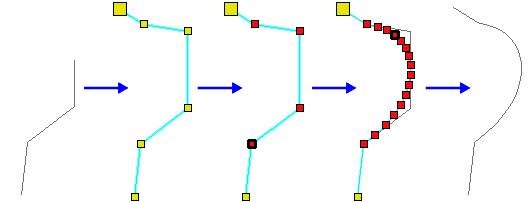
Smooth part of a line or area boundary by creating a cubic spline fit through selected vertices.
Related commands:
Procedure
1. Select range of vertices.
To select a range of vertices, press and hold <Shift> and click on two vertices. All vertices between the two will be selected.
2. Select the Smooth Line command.
The selected vertices are replaced by new vertices that define a smoother curve.