Menu | Edit > Areas > Merge Into |
Tool |
|
Menu | Edit > Areas > Merge Into |
Tool |
|
Merge two or more areas into a single area. The merged area inherits the acronym, attributes, and feature object ID of the superselected area and consists of the combined geometry of all selected areas.
• The areas must share at least one common boundary.
• Areas cannot overlap.
If all selected areas cannot be merged, no areas are merged.
Related commands:
Procedure
1. Select the areas to be merged.
2. Superselect the area that has the acronym and attributes you want to assign to the new area.
3. Select the Merge Areas Into command.
Example
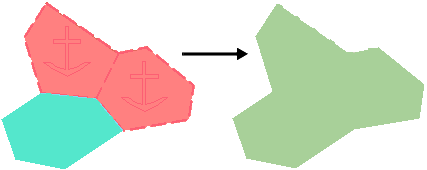
In this example, three adjacent areas are selected, two ACHARE and one DEPARE. The DEPARE area is superselected. After merging, a single DEPARE area exists. The three original areas are deleted.