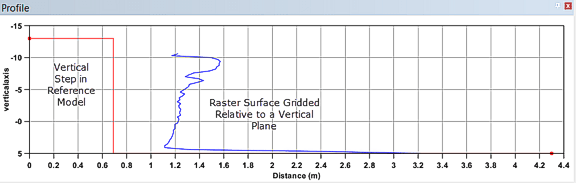
For raster surfaces gridded relative to a vertical plane or TINs of these rasters, only profile lines that are perpendicular to the vertical plane will produce a result in the Profile window. For raster surfaces gridded relative to an inclined plane, profile lines must be oriented down the slope of the inclined plane. As a result, it is recommended to create profiles through the Cross Profile tool or through Stationing in the Engineering Analysis Module. Also note that if the inclined planes are created using the Cross-section tool in the Engineering Analysis Module, the top of the inclined plane is well-defined, as is the orientation of the slope of the inclined planes.
An example of a profile of a raster surface gridded relative to a vertical plane is shown below.