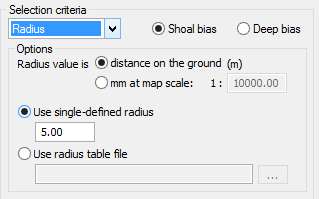
If you choose Radius as your selection criteria, the following option fields are displayed:
The radius value you set (either as a specific value or from a radius table file) will either be applied as metres on the ground, or as the number of millimetres between soundings at map scale.
Once you have set how the radius value will be applied, you can either set the same interval value to be applied to each radius, or have varying values applied from a radius table file.
For example, if you selected Shoal bias, and set a single-defined radius of 5, then only the shoalest sounding within each 5m radius on the ground, or within 5mm at map scale, will be displayed.
1. Set the Radius Value.
• Select distance on the ground (m), or
• Select mm at map scale, and type a scale value in the Map Scale 1: field (default is 1:10000).
2. To set a standard minimum distance between soundings, select the Use single defined radius and enter the interval.
3. To use a radius table to set the minimum distance between soundings, select the Use radius table file option and click Browse to select the file.
4. Click Next.