Three types of critical soundings can be flagged in HIPS:
• Designated : soundings that have been flagged in Swath or Subset Editor as being the shallowest (also called “shoalest”) sounding in an area.
• Outstanding: soundings that have been flagged in Subset Editor as needing further examination.
• Examined: soundings that have been flagged in Subset Editor as having been examined and verified
The Designated flag identifies the sounding on important features.
For example, upright masts on a significant wreck would be flagged as Designated.
The purpose of the Designated flag is to ensure that the shallowest depths over significant seabed features are maintained for standard hydrographic products.
When these soundings are applied to a surface, the surface is regenerated so that the Designated sounding’s depth value is applied to the nearest node (see Finalize).
Identify Designated Soundings
Designated Soundings can be identified in two ways:
• automatically with the Critical Sounding Detection command (see Critical Sounding Detection)
• manually as part of processing in Single Beam, Swath and Subset Editor (see Designated)
Designated soundings can exported to ASCII, CARIS, GSF, and HOB formats.
The location of designated soundings can be viewed in the Display window. They can also be viewed in the HIPS editor in which they are designated.
To view and edit the display properties of critical soundings:
1. Select the Critical Soundings layer in the Layers window.
2. Select or open the Properties window.
Menu | Window > Other Windows > Properties |
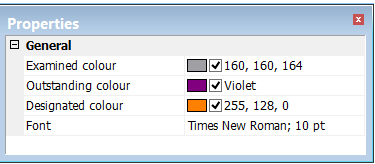
As displayed below, the properties have different colour settings to indicate the status of selected soundings as Examined, Outstanding or Designated. The Font property controls the style and size of the font in which the depth values of the soundings are displayed.