Use the Advanced Options to set and save a new configuration. The default configuration file is C:\ProgramData\CARIS\HIPS and SIPS\10.0/system/CUBEParams.xml
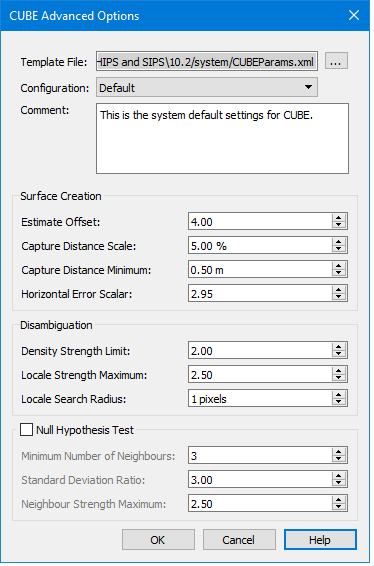
The Advanced Options dialog box displays the detailed configuration settings applied to the CUBE surface. These settings are contained in the CUBEparams.xml file, the location set using Tools > Options > Files and Folders.
You can use the settings in this file or select a custom configuration file. If you use a custom file, use the same syntax and structure as the CUBEparams.xml file.
.You can adjust the configuration settings in these files, but you must save changes before they can be applied. If you do not want to overwrite the CUBEparams.xml file, select New and create a new template file.
Interface
The Advanced configuration dialog box is opened from the browse button in the CUBE Configuration field on the New Regular Gridded Surface dialog box.
Option | Description |
|---|---|
Template file | Displays the name of and path to the file containing the values for the various configurations as set below. To create a new configuration file: 1. Click browse and type the name for the new configuration setting and click OK. |
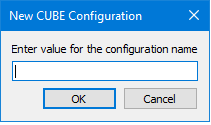
Configuration | Default settings for the select configuration are displayed in the CUBE Configuration field of the previous dialog box. Current configurations are Deep, Default and Shallow. • Deep: This configuration is intended to be used in areas where small features are not likely (shifting sand shoals), not important (steep grades and deep water), or separately located with side scan. This parameter set corresponds with NOAA's 2006 Complete gridding standard. • Shallow: This file defines the parameters for the CUBE algorithm and are intended to be used in areas of critical under-keel clearance, in areas with numerous small features, and multibeam that can stand on its own without feature-by-feature side scan correlation. This parameter set corresponds to NOAA's 2006 Object Detection gridding requirements. • New: select New to open the New CUBE configuration dialog box and create a new configuration. Otherwise the changes will be saved to the CUBEparams.xml file. |
Comment | Displays a short description for each configuration. Additional text can be added. |
Surface Creation | |
Estimate Offset | The threshold for significant offset from current estimate to warrant an the creation of a new hypothesis. The value must be between 0.1 and 10.0. |
Capture Distance Scale | Scale on predicted or estimated depth for how far out to accept data. Value is a percentage of depth used to limit the radius of influence a sounding may have on the grid. Value must be between 1.00 and 100.00. |
Capture Distance Minimum | : The minimum value (in metres) on predicted or estimated depth for how far out to accept data. This value is used in conjunction with Capture Distance Scale to limit the radius or influence of a sounding. Value must be between 0.0 and 100.00. |
Horizontal Error Scalar | : The value used to scale the horizontal error of each sounding when used in the radius of influence computation. Value must be between 0.0 and 10.00. |
Disambiguation | |
Density Strength Limit | The strength value used to switch from the 'density' disambiguation method to the 'locale' version when using the density & locale algorithm. Value must be between 0.00 and 5.00. |
Locale Strength Limit | :Locale Strength Maximum: The maximum strength value allowed as part of the mean in the locale algorithm. Value must be between 0.00 and 5.00. |
Locale Search Radius | Locale Search Radius: The radius of the search when computing the trimmed mean. The values are in pixels and must be greater than zero. The original system default value is 1. |
Null Hypothesis test | Null Hypothesis Test: Flag used to control the application of the NULL hypothesis test. Value must be either True or False. Default value is False. |
Minimum Number of Neighbours | Minimum Number of Neighbours: During the Null Hypothesis test, this controls the minimum number of neighbours that a node must have in order to be considered for the Standard Deviating Ratio test. If the node has less the specified number, it is automatically marked as 'Null'. Values must be between 2 and 8 |
Standard Deviation Ratio | Standard Deviation Ratio: During the Null Hypothesis test, this represents the cut-off limit for the standard devotion ratio including the node in question to the standard deviation of the qualified neighbouring nodes. If the computed ratio exceeds the specified value, the node is marked as 'Null'. Values must be between 0.0 and 10.0. |
Neighbour Strength Maximum | : The maximum strength value that is allowed to be considered as part of the standard deviation computations in the NULL hypothesis test. Value must be between 0.00 and 5.00. |
Procedure
1. [Optional] Browse to select another template file.
2. Select a configuration method from the Configuration drop-down list: Default, Deep or Shallow, or select New to create a new configuration method.
3. Set different values for Surface Creation and Disambiguation fields.
4. [Optional] To apply the Null Hypothesis Test, select the check box, and set values.
5. Click OK to save settings and return to creating a new gridded surface.