Python scripts can be created in a text editor then executed in the Command Prompt window, or created and executed directly in the Command Prompt window. Some of the functions that can be performed with a python script include:
• opening vector files such as shp, gml and kml
• formatting notice instructions and list records into XML format for marine publications
• reading and writing .csar files
• creating, modifying, deleting, and querying features objects in a vector file
• uploading and downloading feature objects to and from a database
• uploading and downloading coverage data to and from database feature objects
• reading a database catalogue
Additional Python functionality is available when Python is being run from In this case, a module is available for each supported version of Python. At least one of these modules must be enabled to use Python in, and the enabled module must coincide with the version of Python installed.
Only one Python module can be enabled at a time. If more than one module is enabled, the application will not function properly. |
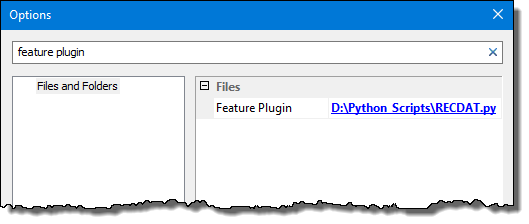
Once a Python module is enabled in the application, a Python script can be used to populate feature attributes when creating feature objects, editing feature attributes and/or adding a coverage to a database. To do this, the Feature Plugin option must be populated with the location of a Python script that defines feature objects and their attributes. This option is found in Tools > Options under the Files and Folders category.
The Feature Plugin option is only available when a Python module is enabled. |
For example, Python scripts are located in the D:\Python Scripts\ folder. The folder includes the RECDAT.py script. This script inserts the current date for a RECDAT (Recording Date) attribute every time an S-57 feature is digitized or edited.
Both the folder and script are referenced from the Feature Plugin option.
Other scripts and paths can be selected when required, but only one script can be run at a time.
For detailed information about Python and all of the functions available for Teledyne CARIS applications, refer to the Python API documentation on the Teledyne CARIS website or contact Teledyne CARIS Customer Service.