Menu | File > New > Product > From S-57 Dataset |
Create an AML, ENC, or IENC product using an existing S‑57 file or HOB file to set the product extent and metadata. This command uses the Create S‑57 Product wizard to generate a standard ENC/AML file name and exchange set.
Once created, the product is displayed in the Layers window. The parent layer contains product metadata. Child layers contain data. The Layout layer contains the product boundary.
The product boundary is defined by the product layer (PROLAY) feature. The coordinates for the product boundary are included with the product metadata.
The new product does not contain data, but data from an external source can be imported using Import Selected Objects or Object Import Utility.
If the product contains features that cannot be readily imported into the new product, a layer called Invalid Objects is created. This is a temporary scratch layer where features can be modified, then imported into the product.
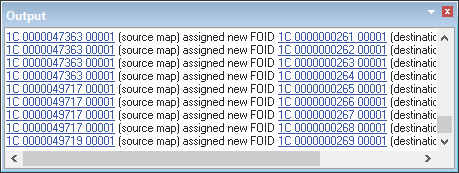
Features with geometries that border or extend beyond the extents of the product area are assigned new feature object IDs when imported. These are listed in the Output window.
Click a source map link to superselect the feature.
Procedure
1. Select the Create Product from S-57 Dataset command.
A File Open dialog box is displayed.
2. Select a file to use as a template.
3. Click Open.
The Select Catalogue dialog box is displayed.
4. Select a catalogue to associate with the product and click OK.
The Create S-57 Product wizard is displayed.
5. Continue to define the product using the wizard.
See Create S-57 Product Wizard for complete details of the Create S-57 Product wizard and for step by step instructions.