Connect to a database using the BASE Manager™ module in BASE Editor. When connecting to a database no data caching is used. Each connection made is a direct connection to the database selected.
1. Start BASE Editor.
2. Open a coverage.
The Database menu is displayed only if the BASE Manager module is enabled.
3. [Optional] If the Database menu is not displayed:
a) Open the Modules tool.
Menu | Tools > Modules... |
b) Enable the BASE Manager component.
c) Click OK.
The Modules tool closes. A message is displayed informing the user that the application must be restarted in order to apply the changes. Click Close to close the message, then restart BASE Editor. Once restarted, the BASE Manager module is enabled and the Database menu is displayed.
4. Select the Open Connection command.
Menu | File > Open Connection |
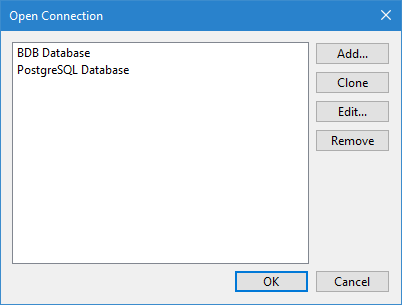
The Open Connection dialog box is displayed.
This command provides a single tool with two functions:
• create and save connections to specific data sources
• connect to a data source through a predefined connection
Predefined connections can be created to connect directly to a data source on any of the following types:
• Bathy DataBASE database
• Oracle Spatial (entire schema or single table) database
• PostgreSQL/PostGIS database
• Spatial FusionTM (ODBC or Oracle Spatial) database
• Web Feature Service (WFS)
Connections are created by defining both the settings used to connect to the data source and the display properties that will be applied to the view when the connection is used. Refer to the CARIS BASE Editor documentation for more information on this tool.
5. [Optional] To define a new connection, click Add and follow the steps in the Add Connection wizard.
6. Select the desired connection in the list of predefined connections. If a new connection was created, that connection is selected by default.
7. Click OK.
A dialog box may be displayed prompting you to enter a password to login to the relevant database.
8. Type a valid Password, if required.
9. Click OK.
The application is connected to the database.