When BDB Server is configured to use Oracle as the RDBMS, schemas are created in the Oracle server to store certain types of information.
Each time that a new database is created in the Node Manager, an additional schema will be created to match. Although these are individual schemas, they are all organized under the Node Manager schema.
To view a list of all of the schemas currently on your Oracle server, one option is to use an SQL command, such as the one provided with the BDB Server installation. This command is provided in the form of a batch file in the following location:
...\CARIS\BDB Server\<version>\system\Oracle_Scripts\listschemas.bat
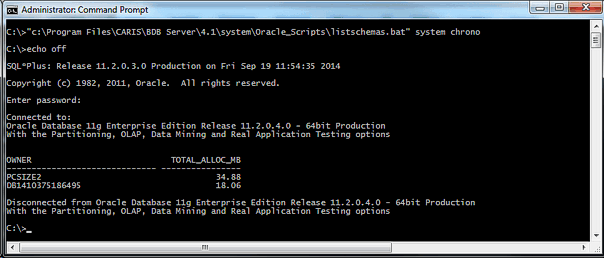
To run the batch file, enter the following command in a command prompt window:
...\CARIS\BDB Server\<version>\system\Oracle_Scripts>listschemas.bat <Oracleadminuser>/<Oraclepassword> <Servicename>
Change the following command parameters to match your system:
• The path needs to point to your Node Manager installation.
• The "Oracleadminuser" must be the username for the administrator account used by Node Manager to access the Oracle server. This can be found in the bathynodemanagerconfig.xml file.
• The "Oraclepassword" must be the password of the Oracle administrator account being used.
• The "Servicename" must match your tnsnames entry that points to the Oracle server.
All schemas on the specified server that are associated with BDB will be listed, along with the amount of space that each is occupying. An example is shown below.