Teledyne CARIS provides bindings for scripting with the Python programming language. These bindings provide a simple, consistent model to automate and integrate data and operations with external functions and software. This is especially useful for performing scheduled and repetitive tasks.
Installation
To use Python, the following must be installed on the workstation where the scripts will be executed:
• A CARIS application that supports Python:
• BASE Editor
• Bathy DataBASE (BDB) Server
• HIPS and SIPS
• HPD and Desktop Solutions
• Python 3.4 or 3.5
• the NumPy Python module
Setup
Once the necessary applications have been installed, you must set the PYTHONPATH environment variable to point to the directory where the CARIS PyAPI is installed.
1. Locate the CARIS PyAPI installation directory for your version of Python. The default location is:
C:\Program Files\CARIS\<CARIS application>\<version>\python\3.5
Next you need to create a new environment variable. This is done in the Windows Control Panel.
2. Launch the Control Panel.
3. Click the System icon.
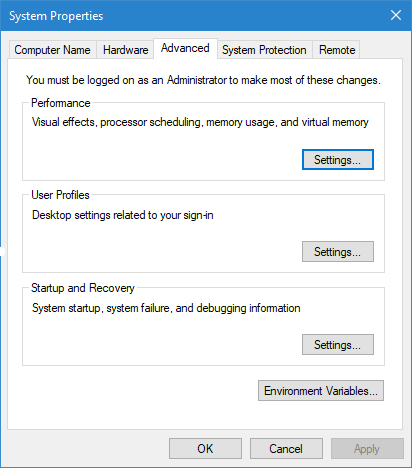
4. Click the Advanced System Settings category in the list on the left of the page.
The System Properties dialog box will be displayed.
5. Click Environment Variables.
The Environment Variables dialog box is displayed.
6. In the System variables panel, click New.
The New System Variable dialog box is displayed.
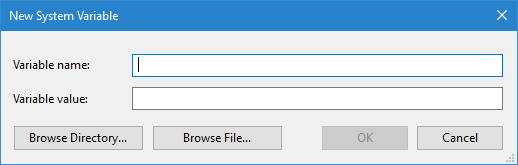
7. In the Variable name field, type PYTHONPATH.
8. In the Variable value field, enter the path to your PyAPI installation directory.
9. Click OK on each of the open dialog boxes to apply the settings.
Follow the steps below to test that your CARIS PyAPI is configured correctly.
1. Open Command Prompt window from the Windows Start Menu.
2. Use a "change directory" (cd) command to navigate to the location of your Python installation directory, such as:
C:\>cd "C:\Users\<username>\AppData\Local\Programs\Python\Python35"
3. Enter the command python and press <Enter> to start a Python console session.
4. In the Python console session, enter the command import caris and press <Enter>.
If this line executes without errors or warning, then the CARIS PyAPI has been configured successfully. You can now create and execute Python scripts. Refer to Using Python for information on the Python functions that are supported in Teledyne CARIS applications.
Licensing
The license used to run Python is dependent on the application from which it is being run. When the Python bindings are loaded, the environment.xml file of the application is accessed and the licensehost_key variable in this file identifies the license to be used. This file can be found in
C:\Users\<username>\AppData\Roaming\CARIS\<application>\<version>\system
If using a network license, it will be populated with the name and domain of the license server machine. If using a local license, it will be populated with “no-net”.