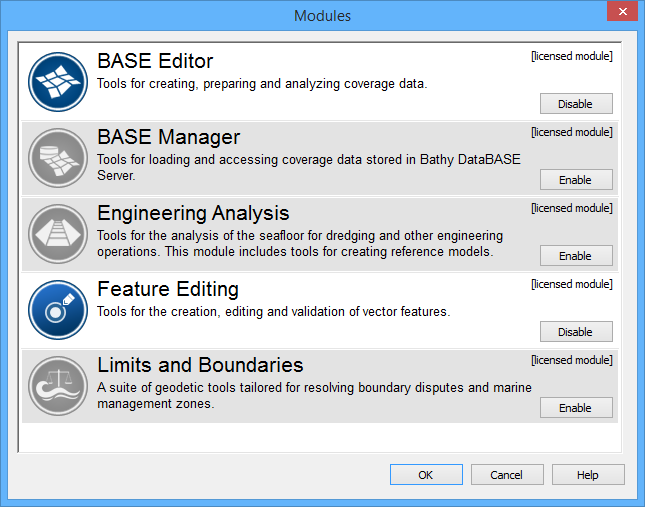
CARIS applications are built on a basic viewer that displays read-only raster and vector data. Application functionality is accessed through modules that create and edit a wide range of products, including nautical charts.
Application modules require licenses but others are unlicensed. Some modules can be activated once an application module is activated.
Any of the following modules can be available depending on the installation.
Module | License | Description |
|---|---|---|
Advanced Sensors | Yes | Tools for displaying and processing water column and Lidar data. The following options are available: • full-density water column display • multiple detections per beam • Lidar waveform viewer • Alternative depth editing This module is available once the HIPS module is activated. |
BASE Editor™ | Yes | Tools for creating, preparing and analyzing coverage data. |
BASE Manager™ | Yes | Tools for loading and accessing coverage data that is stored in a Bathy Database Server. |
Compose™ | Yes | Tools for creating, updating, validating and exporting S-57 and S-100 datasets |
Engineering Analysis™ | Yes | Tools for the analysis of the sea floor for dredging and other engineering operations. The module also includes tools for creating reference models. |
Feature Editing | Yes | Tools for the creation, editing and validation of vector features. This module is automatically activated when the BASE Editor and Limits and Boundaries modules are activated. |
HIPS1 | Yes | Bathymetry and water column processing tools for review, correction, and production of sounding data. |
Limits and Boundaries™ | Yes | Geodetic tools for resolving boundary disputes and marine management zones. |
SIPS2 | Yes | Sonar imagery processing tools to create high-resolution images from raw sonar data and to identify contacts within that imagery. |
SPINE | No | Tool to apply water level forecasts based on calculations from the SPINE web service. |
1 This term is a trademark of Teledyne CARIS, Reg. USPTO.
2 This term is a trademark of Teledyne CARIS, Reg. USPTO.
Modules are activated through the Modules dialog box.
After a license is acquired, a module can become active. When a module is active, commands and windows related to that module are made available in the application.
Both the basic CARIS application and modules share common files in C:\Program Files\CARIS\<application>\<version>\system. These files control what types of data can be opened and how that data is displayed.
In addition to the System folder, each module also has support files to display and process data required by that module. The paths for module-specific files are
C:\Program Files\CARIS\<application>\<version>\modules\
<module name>\support
Specific system and module support files are listed in the Options dialog box.
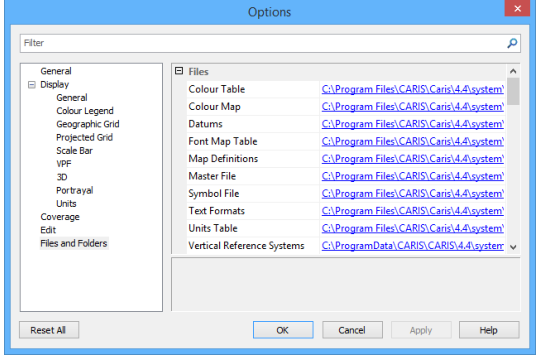
The information in default files can be extended with user-defined custom files that can contain additional information. The application can then be pointed to these custom files.
System and module support files must never be directly modified. Copy these files to another location and modify the copies. Then, point the application to these files through the Options dialog box or environment file. For more information on modifying default settings, see Environment Settings |
The following table lists files or folders that can be copied and customized with new or extended information. Other files provide additional information about the CARIS application.
Files/Folder | Description |
|---|---|
Catalogue control file | The catalogue control file lists products along with the dictionaries and profiles that are associated with each product. This file can be revised or additional information can be added to it. The default file is See Catalogues for more information. |
Portrayal control file | The portrayal control file lists various portrayals along with files that make up each portrayal. Portrayals control how features are displayed. This file can be revised or additional information can be added to it. The default file is For more information about the portrayal control file, see Portrayals. For more information about portrayal files. see Portrayal Files |
Coordinate reference system | Files that define the coordinate reference systems. These also include datums and ellipsoids. For more information on these files, see Coordinate Reference Systems |
Utilities | The Utilities folder contains |
Validation | The Validation folder contains quality control files for checking data structure and logical consistency in S-57, VPF, and geometric data. Tests can be developed for additional file types. Default files are found in
Note that the quality assurance tests for each module are different. For more information on quality control files, see Quality Control |
Rules | The Rules folder contains mapping files to convert formats (e.g. GML to ENC) or to convert features (SLCON line features from LNDARE edges). Default files are found in
Note that mapping files for each module are different. For more information on mapping, see Mapping |
Product information files | The Default files are located in
For more information on product information files, see individual module support file guides. |
Third-party libraries | The The file is available in |