Corner coordinate labels are placed inside any of the four neatline corners. Latitude labels are upright. Longitude labels face the neatline.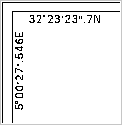
Corner coordinate labels are placed inside any of the four neatline corners. Latitude labels are upright. Longitude labels face the neatline.
Properties
Property | Description |
|---|---|
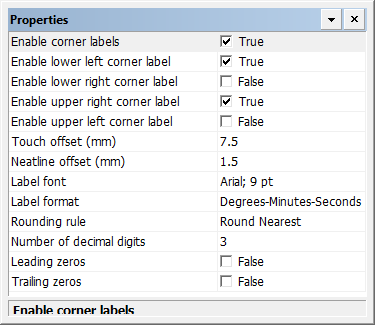
Enable corner labels | True: Display corner coordinate labels. False: Do not display corner coordinate labels. |
Enable lower left corner label | True: Display a label in the lower left corner. False: Do not display a label in the lower left corner. |
Enable lower right corner label | True: Display a label in the lower right corner. False: Do not display a label in the lower right corner. |
Enable upper right corner label | True: Display a label in the upper right corner. False: Do not display a label in the upper right corner. |
Enable upper left corner label | True: Display a label in the upper left corner. False: Do not display a label in the upper left corner. |
Touch offset | The distance between the neatline and the ends of the labels in millimetres at map scale. A value of 0 means that the ends of the labels will touch the neatline and will cross each other. Type a value. |
Neatline offset | The distance between the neatline and the labels in millimetres at map scale. Type a value. |
Label font | The font used for the corner labels. Click browse (...) and select font settings from a font dialog box. |
Label Format | The format used for the coordinates in the labels. Choose from: • Degrees-Minutes-Seconds • Degrees-Minutes • Degrees |
Rounding Rule | Rounding rules for the corner labels. Choose from: • • • |
Number of decimal digits | The number of digits displayed after the decimal point. Type a value. |
Leading zeros | True: Display leading zeros in the labels. The number of zeroes is set by the Number of decimal digits property. False: Do not display leading zeros in the labels. |
Trailing zeros | True: Display trailing zeros in the labels. The number of zeroes is set by the Number of decimal digits property. False: Do not display trailing zeros in the labels. |