Neatline labels are displayed between the neatline and the picture frame.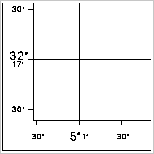
Neatline labels are displayed between the neatline and the picture frame.
All graticule lines must be labelled, if there is space. Additional labels can be generated as long as they align consistently with tick marks.
Neatline labels can be one of these basic formats:
Format | Description |
|---|---|
Full | Full labels are composed of up to four separate names: the degree, minute, seconds, and hemisphere mark for a given latitude or longitude. For example, a label for the latitude 52‑23‑15N is actually composed of four individual labels containing the numbers 52, 23, 15, and the letter N. Trailing zero digits are not used. A position of 52‑23‑00N consists of the labels 52, 23, and N. In other words, full format labels are full in the sense that they show latitude or longitude unambiguously. |
Compressed | Compressed labels are used where only the most precise component of the full label is required. This can be a degree, minute, or second value. For example, if successive labels appear at 52N, 52‑30N, and 53N, the labels are compressed to 52, 30, and 53. The fact that the 30 refers to 52‑30N is implied by the adjacent labels. In some cases, label compression leads to ambiguity. If a given border covers only 30 seconds of latitude from 52‑15N to 52‑45N, for example, the degree value is not displayed. To overcome this, at least one label along an edge must be in the full format. By default, any full label that is required corresponds to the position of the lower-left graticule intersection. |
Properties
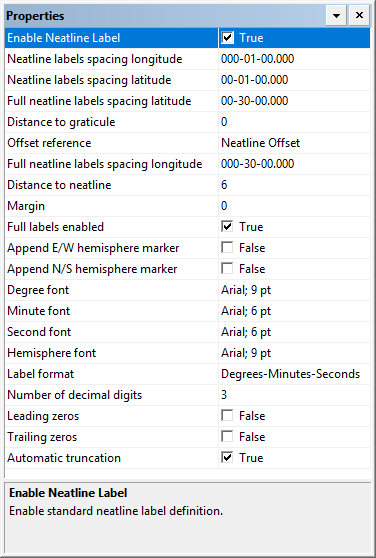
The latitude and longitude settings can be entered in |
Property | Description |
|---|---|
Enable Neatline Label | True: Display neatline labels. False: Do not display neatline labels. |
Neatline labels spacing longitude | Spacing between neatline labels. Type a value. |
Neatline labels spacing latitude | Spacing between neatline labels. Type a value. |
Full neatline labels spacing latitude | Spacing between full neatline labels. This must be a multiple of Neatline labels spacing latitude. Type a value. |
Distance to graticule | The distance from the graticule to the centre of the label in millimetres at map scale. A positive value moves the label up; a negative value moves the label down. Type a value. |
Offset reference | The reference for the offset. Choose from: • Neatline Offset • Between Neatline and Picture Frame |
Full neatline labels spacing longitude | Spacing between full neatline labels. This must be a multiple of Neatline labels spacing longitude. Type a value. |
Distance to neatline | The distance from the neatline to the centre of the label in millimetres at map scale. A positive value places the label outside the neatline; a negative value places the label inside the neatline. Type a value. |
Margin | If the Offset reference is Between Neatline and Picture Frame, you can set top and bottom margins between the label and the picture frame. Type a value. |
Full labels enabled | True: Display full labels. False: Do not display full labels. |
Append E/W hemisphere marker | True: Display the hemisphere marker (E or W) in full latitude labels. False: Do not display the hemisphere marker. |
Append N/S hemisphere marker | True: Display the hemisphere marker (N or S) in full longitude labels. False: Do not display the hemisphere marker. |
Degree font | The font used for the degree labels. Click browse (...) and select font settings from a font dialog box. |
Minute font | The font used for the minutes labels. Click browse (...) and select font settings from a font dialog box. |
Second font | The font used for the second labels. Click browse (...) and select font settings from a font dialog box. |
Hemisphere font | The font used for the hemisphere markers. Click browse (...) and select font settings from a font dialog box. |
Label Format | The format used for the coordinates in the labels. Choose from: • Degrees-Minutes-Seconds • Degrees-Minutes • Degrees |
Number of decimal digits | The number of digits displayed after the decimal point. Type a value. |
Leading zeros | True: Display leading zeros in the labels. The number of zeroes is set by the Number of decimal digits property. False: Do not display leading zeros in the labels. |
Trailing zeros | True: Display trailing zeros in the labels. The number of zeroes is set by the Number of decimal digits property. False: Do not display trailing zeros in the labels. |
Automatic truncation | For neatline labels that are set to degrees-minutes but contain no minute values: True: The label is truncated to degrees only. (for example, 51°). False: Both degrees and minutes are displayed (for example, 51° 00'). |