Graticule labels indicate the current position of the latitude and longitude lines at each intersection point of the grid.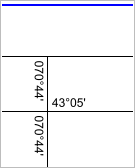
Graticule labels indicate the current position of the latitude and longitude lines at each intersection point of the grid.
Properties
Property | Description |
|---|---|
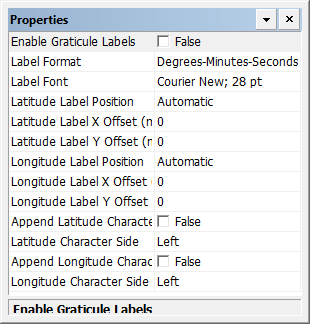
Enable Graticule Labels | True: Display graticule labels. False: Do not display graticule labels. |
Label Format | Display formats. Choose from: • Degrees-Minutes-Seconds • Degrees-Minutes • Degrees |
Label Font | The font for the labels. 1. Click browse (...). The Font dialog box is displayed. 2. Select a font, style, size, and colour for the labels. |
Latitude Label Position | The position of the label relative to the meridian. Choose from: • Above • Below • Automatic |
Latitude Label X Offset (mm) | X offset for the latitude label in millimetres at map scale. |
Latitude Label Y Offset (mm) | Y offset for the latitude label in millimetres at map scale. |
Longitude Label Position | The position of the label relative to the meridian. Choose from: • Left • Right • Automatic |
Longitude Label X Offset (mm) | X offset for the longitude label in millimetres at map scale. Type a value. |
Longitude Label Y Offset (mm) | Y offset for the longitude label in millimetres at map scale. Type a value. |
Append Latitude Character | True: Append the latitude character (N or S) to the latitude label. False: Do not append the latitude character. |
Latitude Character Side | The position of the latitude character. Choose from left and right. |
Append Longitude Character | True: Append the longitude character (E or W) to the latitude label False: Do not append the longitude character. |
Longitude Character Side | The position of the longitude character. Choose from left and right. |