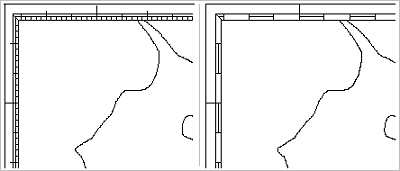
Dicing refers to additional lines displayed between the neatline and the neatline frames, with the visual effect of highlighting the tick marks along the neatline.
The length of dicing lines is specified as a latitude or longitude interval, which should be a whole multiple of the full tick spacing. If two neatline frames are used, the dicing lines are displayed between the frames. If only one neatline frame is used, dicing is displayed between the frame and the neatline itself.
Dicing lines always appear to the south of latitude ticks and to the east of longitude ticks. Both latitude and longitude ticks are even multiples of the dicing length. For example:
• If the dicing length is 1 minute, a dicing line would start at 50-40N, and extend south to 50-39N. The next dicing line would start at 50‑38N.
• If dicing length is 30 seconds, a dicing line would start at 50‑40N, and extend south to 50‑39‑30N. The next dicing line would start at 50‑39N. Although 50‑39N is not an even minute, it is an even multiple of the dicing length.
Properties
Property | Description |
|---|---|
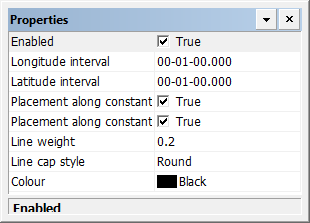
Enabled | True: Display dicing. False: Do not display dicing. |
Longitude interval | Interval between dicing marks on the longitude lines. This must be a whole multiple of the full tick spacing. Type a value. |
Latitude interval | Interval between dicing on the latitude lines. This must be a whole multiple of the full tick spacing. Type a value. |
Placement along constant longitude | True: Dicing lines are placed along a constant latitude in the east/west direction. False: |
Placement along constant latitude | True: Dicing lines are placed along a constant longitude in the north/south direction. False: |
Line weight | The thickness of the dicing lines in millimetres at map scale. Type a value. |
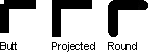
Line cap style | The end style of the lines. Styles are butt, projected, and round. Select from the list. |
Colour | The colour of the dicing lines. Click the button and choose a colour from the colour picker. |