Use the Template Editor to define borders, scale bars, projected grids, and subsidiary graduations. Each of these can be saved and added to marine products.
Template files can be saved using any name but must have the following file extensions.
Template Component | File Extension |
|---|---|
Borders |
|
Scale Bars |
|
Subsidiary Graduations |
|
Projected Grids |
|
Default templates are stored in C:\Program Files\CARIS\HPD\ <version>\system\PCEConfig. Your customized template files can be stored in any directory you choose.
The Template Editor supports unicode. Borders and other template components can be produced in multiple language formats.
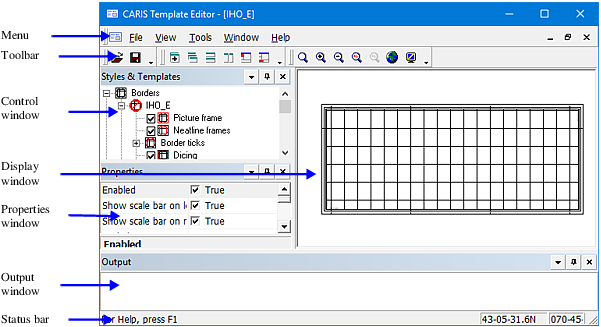
Start Template Editor from Paper Chart Editor.
1. Select Tools > Report > Template.
Template Editor is displayed.
Interface Element | Description |
|---|---|
Menu bar | Template Editor commands. Many commands are also available on toolbars. See Commands for a complete list of commands. |
Toolbar | Toolbars allow quick access to commonly used commands. |
Styles & Templates window | Controls the styles and templates of the following features: • borders • scale bars • subsidiary graduations • projected grids |
Display window | Displays the template features and changes as they are edited. |
Properties window | Displays properties and values for the component selected in the Control window. The properties vary depending on the component selected. |
Output window | Displays messages about the selected template. |
Status bar | Displays information on the currently selected tool, property, or setting. |