Menu | Tools > Options |
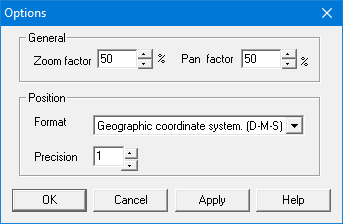
Set options that control the behaviour of the zoom and pan commands and the position of the data.
Related commands:
• • | • |
Interface
Option | Description |
|---|---|
General | • Zoom factor: The percentage used by the Zoom In and Zoom Out commands. Use the up and down arrows to select a new value. • Pan factor: The percentage used by the Pan Up, Pan Down, Pan Left, and Pan right commands. Use the up and down arrows to select a new value. |
Position | • Format: The coordinate system used to define the template features. Select from the list. • Precision: The precision used for the coordinates. Use the up and down arrows to select a new value |
Procedure
1. Select the Options command.
The Options dialog box is displayed.
2. Set any necessary options.
3. Click OK.