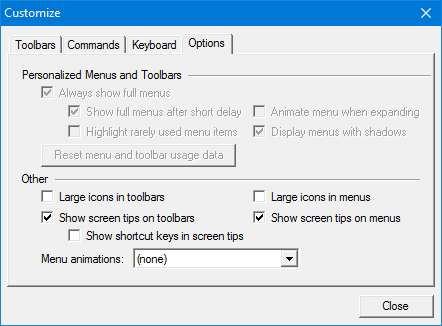
Display options for the toolbars and menus.
Interface
Option | Description |
|---|---|
Large icons in toolbars | On: The toolbar icons will be 32x32 pixels. Off: The toolbar icons will be 16x16 pixels. |
Large icons in menus | On: The menu icons will be 32x32 pixels. Off: The menu icons will be 16x16 pixels. |
Show screen tips on toolbars | On: Screen tips are displayed when you hover over a toolbar icon. Off: No screen tips are displayed. |
Show shortcut keys in screen tips | On: Keyboard shortcuts are displayed in the screen tips. Off: Keyboard shortcuts are not displayed in the screen tips. |
Show screen tips on menus | On: Screen tips are displayed when you hover over a menu item. Off: No screen tips are displayed. |
Menu animations | Animations can be used when menus are displayed. Select from the list. |
Procedure
1. Select the Options tab.
The Options tab of the Customize dialog box is displayed.
Normal icons are 16x16 pixels. Large icons are 32x32 pixels.
2. Set any required options.