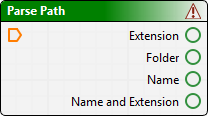
Breaks a file path into its component parts: extension, folder, file name, or the file name plus extension. You can then use the Compose Path process to re-combine these parts as necessary.
This is useful, for example, if you want to run the same process on a number of inputs and use the input file name to create a distinct file name for each output.
Property | Description |
|---|---|
Path | Set the path to the input file. 1. Click Browse (...) to select a folder and file or type the full path and file name directly. |
For example, if your input path and file name is D:\work\output\data.txt, it will produce the following output:
• Folder name: D:\work\output
• File name: data
• File extension: txt
• File name and extension: data.txt