 Product Editor
 Product Editor
Menu | File > Create New Database Product From > Existing Product |
Create a new S-57 product using an existing HPD product as a template by one of these methods:
• Using metadata from the selected product. The extent is defined separately. Source data that falls within the extent of the new product extent is automatically imported.
• Using an empty template and metadata from the selected product. The extent is defined separately. The Create > Product Data command is used to add data.
Related commands:
• • • • • | • • • • |
Interface
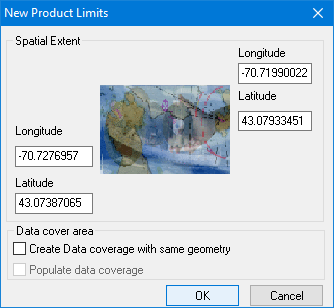
Option | Description |
|---|---|
Spatial Extent | The spatial extent is taken by default from the zoom setting of the Display window. You can change this if necessary by editing the latitude and longitude fields. |
Data cover area | Select the method of populating the product with data. Create data coverage with same geometry: • On: Creates a product with a data cover area that is same as the spatial extent but not populated with data. Populate data coverage becomes available. • Off: Creates a product with a spatial extent and no data cover area (thus not populated with data). Populate data coverage: • On: The product is populated with data from within the spatial extent defined • Off: The product is not populated with data. If both options are on, no additional commands are required as the data coverage area is already selected and the product is populated with data. |
Procedure
1. Zoom in on an area in the Display window.
This area will define the product extents.
2. Select the Create New Product from Existing Product command.
The Select Product dialog box is displayed.
3. Select a product to use as a template and click OK.
The New Product Limits dialog box is displayed.
4. If necessary, modify the Spatial Extent values.
5. Set the Data cover area options.
6. Click OK.
Step 1 of the Create S-57 Product Wizard is displayed. Many of the fields are filled with metadata from the selected product.
See Create S-57 Product Wizard.
7. Complete the Create S-57 Product Wizard.
A new product is created and displayed in the Layers window. You should immediately save the new product.
Important: Save the new product before modifying it. |