Publications Module uses certification to track the progress of list records, notices, and publications. Access to certification commands are determined by user roles. For more information, see User Roles.
Certification can be applied to:
• Notices, including instructions
• Light records, including all records
• Publication sections.
Every notice is assigned one of the status values shown in the following table.
Status | Description |
|---|---|
Under Construction | This status is assigned to all new notices or records or whenever any information is edited. |
Not Verified | This status is assigned after editing is complete and the notice is submitted for verification. |
Accepted | This status is assigned when a notice is known to be acceptable (this step is optional) |
Verified | This status is assigned if a Quality Control user deems a notice is acceptable (complete and correct) and ready for publication. |
Rejected | This status is assigned if a Quality Control user deems a notice is unacceptable (incomplete or incorrect) rejected notices must be reprocessed and re-submitted for verification (status reset to Not Verified, Accepted, or Verified). |
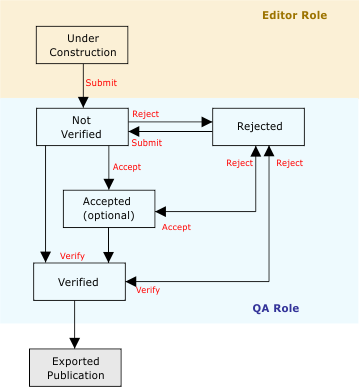
This diagram shows the typical workflow for certifying notices. User roles determine which certification functions can be performed.
If a change is made to a notice, it is automatically re-assigned to Under Construction regardless of the previous value. |
The certification process in Publications Module allows for setting a Verified notice to Rejected. A Rejected notice can be reset to Not Verified or Accepted. A Rejected notice can also be directly reset to Verified.