 CARIS HPD Source Editor
 CARIS HPD Source Editor
Menu | Tools > Report > Products Using Selected Features |
Search HPD products (ENC, AML, paper charts, and GML products) for selected source features. The products containing the source features can be opened as separate layers.
The product is view-only and cannot be edited.
The default portrayal mode for paper charts is INT1. If your chart uses a custom portrayal, copy all custom portrayal files from Paper Chart Editor to corresponding folders in Source Editor and update the portrayal control file so that the custom portrayal can be selected from the list. See Portrayal for more information.
Related commands:
• • • • | • • • • |
Procedure
1. Select a feature.
2. Select the Report Products Using Selected Features command.
The results are displayed in the Output window.

If no products are found, messages to that effect are displayed.
If there are products containing the selected feature, a link is provided to the product.
3. Click the link to open the product as a layer.
If you click a link for a chart panel, a message is displayed to inform you that the default portrayal is INT1.
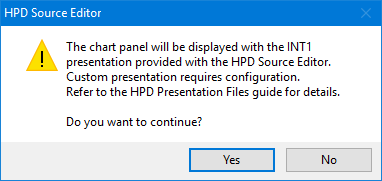
4. Click Yes.
The product is opened.
To view the product, select the Refresh command.