
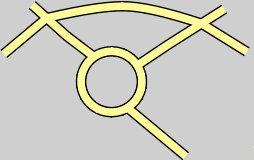
A masking rule can be applied to override (or “punch out”) other colours in raster dynamic masking. For example, intersections of road features are drawn with no overlapping edges. See below.
In this case, each line is symbolized using both the ALROAD1 and ALROAD2 feature codes which create a double-line appearance. These lines are still overlapping but edges at the intersections are masked using the Erase_Land rule in maskingrules.xml. You do not need to manually mask edges where the two lines meet.
This is an example of the Erase_Land rule in the raster masking rules file.
<cmr:Rule Name="Erase_Land"> <cmr:Erasing> <cmr:Source> <cmr:Token>Land_Area</cmr:Token> </cmr:Source> </cmr:Erasing> </cmr:Rule> |
The Land_Area colour overrides the fill in the ALROAD1 and ALROAD2 symbolization.
The tags for this type of masking rule are listed in this table:
Tag | Attribute | Description |
|---|---|---|
<Rule> | Name | The The Name attribute is the name of a specific masking rule. Name is also used in the lookup table to link a feature to a masking rule. |
<Erasing> |
| The |
<Source> |
| The colour that is used for erasing. |
<Token> |
| The specific colour token (name) to which is applied as the eraser. The names are taken from the various colour files that are contained in the HPD installation. |
Override masking can be combined with raster dynamic masking to provide additional masking capabilities. For example, a built-up area overlays a land area feature. Road lines run through the built-up area.
When Erase_Land is applied, intersections for road features are masked, but the fill colour for the road lines is the same as for the built-up area. See below.

A masking rule can be combined with the override masking so that the Built_Up_Area fill is removed from the road and the Land_Area colour token is used. See example below.
An example of a combined masking rule in maskingrules.xml is shown below.
<cmr:Rule Name="Erase_Land"> <cmr:Masking> <cmr:Style>outline</cmr:Style> <cmr:Width uom="mm">0.0</cmr:Width> <cmr:Target> <cmr:Token>Built_Up_Area</cmr:Token> </cmr:Target> </cmr:Masking> <cmr:Erasing> <cmr:Source> <cmr:Token>Land_Area</cmr:Token> </cmr:Source> </cmr:Erasing> </cmr:Rule> |
Masking hides the Built_Up_Area colour while erasing removes lines from the Land_Area fill for roads,
When masking and erasing are combined – the masking instructions must appear before the erasing instructions.