CARIS HPD Publications Module
 CARIS HPD Publications Module
Menu | File > Open > Project |
Tool |
|
Key | Ctrl+O |
Open a project.
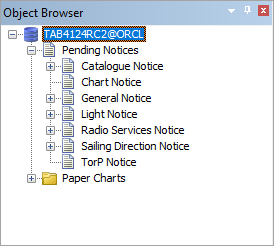
When a project is opened, Pending Notices layers are displayed in the Object Browser. Notices can be created in the Pending Notices layers and moved to a publication at a later time.
If you are capturing data from a paper chart in HPD, the project must belong to the same schema as the chart. The available paper charts are provided in the Paper Charts folder below the Pending Notices folder. Only populated paper charts and external paper charts are included in this folder.
Related commands:
• • • • | • • • • |
Procedure
1. Select the Open Publications Project command.
The database dialog box is displayed.
2. Type a Username and Password.
3. Select a Database from the list.
4. Click OK.
The Select Project dialog box is displayed.
5. Select a project and Click OK.
When a project is opened, a list of notice types and available papers charts is displayed in the Object Browser.