 CARIS HPD Paper Chart Editor
 CARIS HPD Paper Chart Editor
CARIS Paper Chart Composer
CARIS S-57 Composer
Menu | File > New > Scratch Layer |
Create a temporary layer for digitizing or editing features.
The Scratch Layer is a “scratch pad” where you can digitize new features or edit existing features before importing them into the panel.
For example, you can open an external data set and import a feature from that dataset into the Scratch Layer. You can then further modify it using the editor’s digitizing tools. The modified feature can be imported into the panel.
You can open more than one Scratch Layer. The Scratch Layer is active only while the application is open.
Data that is imported into the scratch layer is defined using a catalogue.
Procedure
1. Select the New Scratch Layer command.
The Select Catalogue dialog box is displayed.
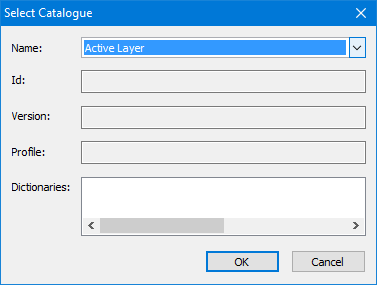
2. Select a catalogue from the Name drop-down list.
The other fields are automatically filled when the catalogue is selected.
3. Click OK.
A new Scratch Layer is displayed in the Layers window.
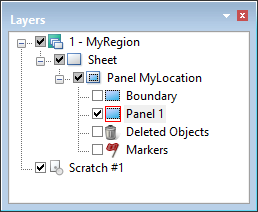
4. Select the Scratch Layer so that it is active.
You might have to turn other layers on (check mark displayed) or off (no check mark displayed) to clearly view features on the scratch layer.