 CARIS HPD Product Editor
 CARIS HPD Product Editor
CARIS HPD Source Editor
CARIS HPD Paper Chart Editor
Pop-up | Display Project Information (History window) |
Display information about the HPD project with which the feature is associated. For more information on projects, see HPD Projects in the HPD® User Guide.
Related commands:
• • • | • • • |
Interface
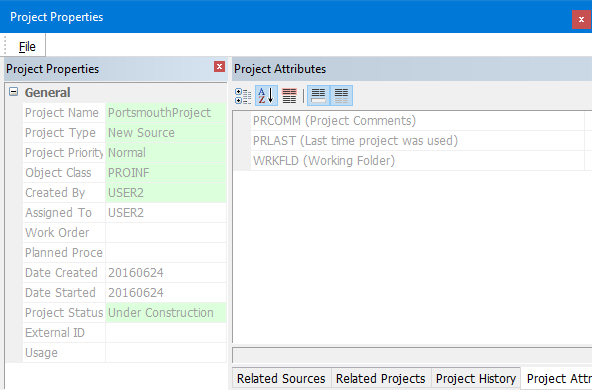
Window | Description |
|---|---|
Project Properties | The properties of the selected HPD project. Read-only |
Related Sources | A list of any sources related to the selected HPD project. Read-only. |
Related Projects | A list of any projects related to the selected HPD project. Read-only. |
Project History | The history of all modification made to the selected HPD project. Read-only. Sort the history by clicking a column heading. |
Project Attributes | A list of all attributes of the selected HPD project. Read-only. |
Source Properties | A list of source properties. Read-only. |
Source Attributes | A list of all attributes of the selected source. Read-only. |
The toolbar at the top of the Project Attributes and Source Attributes contains the following commands:
Tool | Description |
|---|---|
| Sort attributes by category. |
| Sort attributes in alphabetical order. |
| Always display mandatory attributes first, regardless of sort method. |
| On: Display a description of the selected attribute at the bottom of the Attributes list. Off: Do not display a description. |
| On: Display only attributes with defined values. Off: Display all attributes. |
The following commands are available from the File menu:
Command | Description |
|---|---|
Export Project to File | |
Export Selected Source to File | |
Close | Close the dialog box. |
Procedure
1. Select the Display Project Information command.
The Project Properties dialog box is displayed.
2. Select any necessary tabs and view the information in the windows.


