CARIS HPD Product Editor
 CARIS HPD Product Editor
Menu | Create > Data Cover Areas |
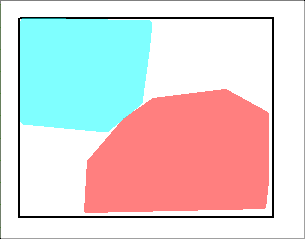
Data cover areas are polygons within a product boundary. For S‑57 products, source data will be loaded into these areas to create an S-57 product. For tiled raster products, tiles will be drawn over these area and the source data will be used to create a raster image for each tile.
This command is used when an S-57 product or a tiled raster product has been created with the limits defined but not yet populated with data. It defines one or more data cover areas within the product limits.
These areas are used in conjunction with the Create Product Data command.
Procedure
1. Select the Layout layer.
2. Select the Create Data Cover Areas command.
The cursor changes.
3. Digitize a polygon that covers data you want to include in the product.
You can click to digitize vertices or right-click and choose any area digitizing method from the pop-up menu.
4. Stop digitizing.
5. Refresh the display
The polygon is shown in the Display window.
Repeat as necessary to create other data cover areas.
Data cover polygons have the attribute SRCEXT.
This example shows two custom data cover areas within the default extent area: