 CARIS HPD Paper Chart Editor
 CARIS HPD Paper Chart Editor
Menu | Edit > Copy > From Panel to Panel > Update Superselection Edit > Copy > From Panel to Panel > Update Selection |
Copy features on overlapping panels from one panel to another.
This command must be used in conjunction with the Panel Overlap Summary command. For more information, see Panel Overlap Summary.
A selected feature can be copied directly to a panel or its geometry can be clipped to the extent of the panel to which it is being copied.
Masking is retained when a feature is copied, but you should examine the masked feature in the target panel to see if masking has been applied correctly.
This command should only be used to copy cartographic features between panels. For updating geographic features, use the Compare Panel to Source and Apply Changes in Source to Panel commands for each panel in the chart.
When the Panel Overlap Summary command is applied, a Panel Overlap Summary layer is created. See below.
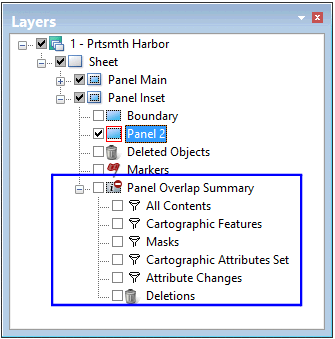
The following sub-layers are created in the Panel Overlap Summary layer.
Sublayer | Description |
|---|---|
All Contents | Contents of the panel chosen for comparison to the highlighted panel data layer. |
Cartographic Features | Cartographic features detected in the panel overlap area. |
Masks | Features for which some edges are masked. |
Cartographic Attributes Set | All features for which a cartographic attribute was set. The filter file, cartographic_attributes_set.crfx, is available in |
Attribute Changes | Features for which an attribute change was detected in one panel but not in the other. To view details, right-click the mouse and select Report Differences from the pop-up menu. |
Deletions | Deleted features that are still active in other panels. |
Related commands:
• | • |
Procedure
1. Select a Panel Overlap Summary sub-layer.
2. In the Display window, select one or more overlap layer features.
3. Select the Copy Update From Panel to Panel command.
The Update option copies the entire feature; the Clip option clips feature geometry to the panel extent.
The selected overlap features are copied to the other panel.