CARIS HPD Source Editor
 CARIS HPD Source Editor
Menu | Usages > Apply Representation Updates > Superselection Usages > Apply Representation Updates > Selection |
Automatically apply representation updates from an active usage to higher scale usages. This command can be applied to all geometric types.
Updates are applied sequentially, from the active usage to the next higher order usage and so on. The active usage is where the initial representation change was made. A higher order usage is usually a usage using a smaller scale.
If the representation is not contained on the usage, that usage is skipped.
The representation on the active usage can be set to any certification status, but representations on the higher order usages are set to Under Construction once updates are made. See Certification for more information.
This command is not available for Deleted features.
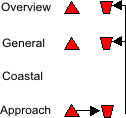
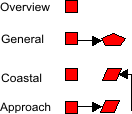
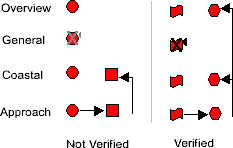
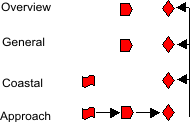
The following conditions demonstrate how the Apply Representation Updates command is used:
Condition | Description |
|---|---|
1 | The feature is not included in any usage other than the active usage. The command cannot be applied. |
2 | The initial representation was added to higher order usages and not modified on the active usage. The command cannot be applied. |
3 | The initial representation was not added to all higher order usages. The usage without the representation is skipped. |
4 | The representation on a higher order usage is imported from a source other than the active usage. That representation is also updated if it contains identical geometry to the representation on the active usage. |
5 | The representation on a higher order usage has been changed independently of representations on other usages. That representation is not updated and the update process is blocked from updating other higher order usages. |
6 | The representation on a higher order usage has been deleted but not verified. That representation is not updated and the process is blocked from updating other higher order usages. If the deleted representation has the Verified certification status, that representation is skipped and representations on other usages are updated. |
7 | The representation on the active usage has been changed and applied to higher order usages. Later, the active usage representation is changed again. The later update will apply to all usages. |
8 | The initial representation was added to higher order usages and was modified separately on a higher order usage. No updates are applied. |
Procedure
1. Select the layer that contains the features with the changed representations.
2. Select the features that have been changed.
3. Select the Apply Representation Updates command.
The representations are updated on the higher order features, depending on the above conditions.
The results are shown in the Output window.