 CARIS HPD Paper Chart Editor
 CARIS HPD Paper Chart Editor
CARIS HPD Product Editor
CARIS HPD Source Editor
Menu | File > Open > HPD Additional Layers > Deleted Features |
View features that have been verified as deleted.
Deleted features in both products and workspaces can be displayed.
If you verify a feature as deleted when this layer is active, you must close and re-open the layer to view the newly deleted feature.
Related commands:
• | • |
Procedure
1. Save your changes.
2. Select the product or workspace layer in the Layers window.
3. Select the Add Deleted Features Layer command.
A Deleted Features layer is added to the Layers window.
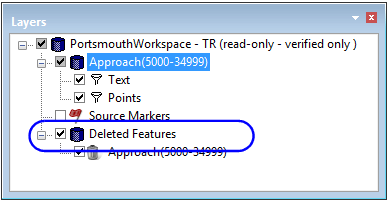
The draw order and display properties used for other layers are also applicable to the Deleted Features layer (see Layers).
4. Enable the Deleted Features layer and refresh the display.
Menu | View > Refresh |
Tool |
|
Key | F5 |
Verified deleted features are displayed.
See information about the deletion process for a feature by selecting the feature and viewing its history in the History window (see History).
