Tool |
|
Pop-up | Set As Snap/Grab Target (Layers window) |
Tool |
|
Pop-up | Set As Snap/Grab Target (Layers window) |
Designate a layer as the target layer containing the vertices to which you will snap when selecting or creating data.
In order to snap to existing vertices, you must have a layer designated as the target layer containing the vertices to which you will snap. By default, the currently selected layer is set as the snap/grab target if it is a snappable layer. When the target layer is changed from the default to a specific layer, the selected layer is remembered until a different target is selected, regardless of the active layer in the Layers window.
This command is accessible from either a pop-menu in the Layers window or the Editing toolbar.
• Accessing the command from the pop-up menu automatically sets the active layer as the snap/grab target.
• Accessing the command from the toolbar will differ depending on the location of the toolbar, displaying as either a drop‑down list or a toolbar button.
• The drop-down list is displayed when the toolbar is in a horizontal position. The list is populated with all snappable layers currently open in the application. It will read “Use current layer” by default if the active layer is snappable. If a layer is active that is not snappable, the drop-down list is disabled. Selecting a layer from the list sets that layer as the snap/grab target.
• The toolbar button is displayed when the toolbar is in a vertical position. This button launches a dialog box containing the same drop-down list that is provided in the horizontal toolbar. Selecting a layer from the list sets that layer as the snap/grab target.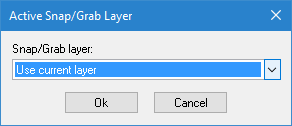
Procedure
1. Select a layer in the Layers window.
2. Select the Set As Snap/Grab Target command.
3. Select a layer from the drop-down list, if necessary.
4. Click OK if using the dialog box.
The selected layer is now a snap/grab target.

