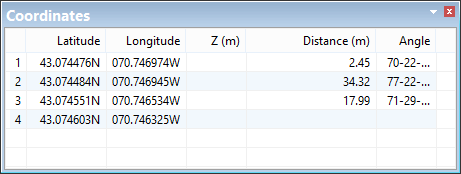
The Coordinates window displays coordinate information for points or line segments making up the geometry of a feature.
Coordinates of a line:
Coordinates of a sounding:
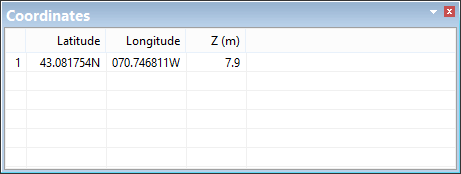
By default, this window contains the following columns:
Column | Description |
|---|---|
Latitude | Latitude of points or vertices of an edge. This column is called X(m) if you are using ground coordinates. |
Longitude | Longitude of points or vertices of an edge. This column is called Y(m) if you are using ground coordinates. |
Z (m) | Depth or elevation of soundings. |
Distance | The distance between two vertices. Displayed for lines only. |
Angle | The angle between vertices on an edge. Displayed for lines only. |
The columns in this window and the display of coordinates differ based on the Coordinate Type and Angle Reference set in the Units category of the Tools > Options dialog box.
This section explains how coordinates and angles are displayed in the various formats. The commands available in this window will vary depending on the enabled modules.
There are two coordinate types, geographic and ground.
Coordinate Type: Geographic
Geographic coordinates are in latitude and longitude and include an indication of the direction from the equator or the prime meridian, as appropriate.
• Quadrant indicator: The indicator is a character at the end of the coordinate value, which can be N,n,S,s,E,e,W,w.
• Positive and negative: The indicator is a plus or minus sign at the start of the coordinate value. North and East are positive (+), West and South are negative (-). If you do not enter an indicator, the coordinate value will be positive.
Geographic coordinates are entered according to the Geographic Format option:
Option | Format | |
|---|---|---|
Degrees Minutes Seconds | DD-MM-SS.ssssQ | +/-DDD-MM-SS.ssss |
Degrees Minutes | DDD-MM.mmmmQ | +/-DDD-MM.mmmm |
Degrees | DDD.ddddQ | +/-DDD.dddd |
The number of decimal places on the smallest units is set using the Precision option under Tools > Options > Coverage > Geographic Distance Along Axis. Precision can range from 0 to 9. If the value is 0, all degree, minutes, and seconds values must be whole numbers.
Examples:
Quadrant indicator | Positive/Negative | ||
|---|---|---|---|
Latitude | Longitude | Latitude | Longitude |
43-04-04.103040N | 070-44-27.973680W | +43-04-04.103040 | -070-44-27.973680 |
43-04.068384N | 70-44.466228W | +43-04.068384 | -70-44.466228 |
43.067806N | 070.741104W | +43.067806 | -070.741104 |
Regardless of how you enter coordinates, they will be displayed with the quadrant identifier.
Coordinate Type: Ground
Ground coordinates are measured in eastings and northings (X,Y). These can be positive or negative. They do not refer to north, south, east, and west.
Format:
XXXXXXX.xxxxxx, YYYYYYY.yyyyyy
-XXXXXXX.xxxxxx, -YYYYYYY.yyyyyy
You set the units and number of decimal places using the Ground Units and Ground Precision options.
For example:
X | Y |
|---|---|
-70.741104 | 43.067806 |
Angle
The angle reference type is used when entering or displaying angles.
These are the available angle reference types and the format used when entering each:
Reference | Convention | Range | Format | Example |
|---|---|---|---|---|
Mathematical | counter-clockwise from east | 0 - 360 | +/-DDD-MM-SS.ssss +/-DDD-MM.mmmm +/-DDD.dddd | 158-48-06.04 |
North Azimuth | clockwise from north | 0 - 360 | 91-26-43.19N | |
South Azimuth | clockwise from south | 0 - 360 | 271-26-43.19S | |
Bearing | from/to For example, | N/S/E/W DDD-MM-SS.ssss N/S/E/W N/S/E/W DDD-MM.mmmm N/S/E/W N/S/E/W DDD.dddd N/S/E/W | S88-33-16.81E | |