Menu | Tools > Engineering Analysis > Shoals > Classify Boxes |
Tool |
|
Menu | Tools > Engineering Analysis > Shoals > Classify Boxes |
Tool |
|
The Classify Boxes command is used to classify shoal boxes according to their risk level. The default classifications are defined in the sample support files, roadwork_classifications.xml and shoal_classifications.xml, located in:
C:\ProgramData\CARIS\<application>\<version>\SampleData\
These files can be updated in CARIS Reference Model Editor. By default, the classifications are:
• Low risk
• Moderate risk
• Severe risk
All shoals are classified when they are detected. The current classification of a box can be found in the Attributes window under the Classification attribute (shlcls) when a box is selected.
Related commands:
Interface
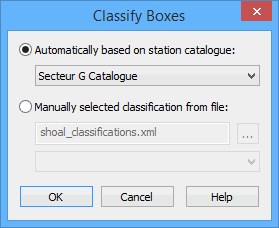
The Classify Boxes command uses the following dialog box.
Option | Description |
|---|---|
Automatically based on station catalogue | Select this option to classify shoals automatically using the reference depth of a station catalogue in the reference model. By default, the last station catalogue that was selected in a dialog box for a Shoals command will be selected here. 1. Click the Automatically option. 2. Select a station catalogue from the drop-down list. |
Manually selected classification from file | Select this option to manually choose the classification settings for the shoal boxes. You must first select the classification file from which the classification levels will be provided. Once a file is selected, the drop-down list will be populated with the classification levels available in the selected file. 1. Click the Manually option. 2. Click the browse button to launch a standard Windows Open dialog box and select the relevant classification file. The drop-down list is populated. 3. Select the classification from the drop-down list to be assigned to the shoal boxes. |
Procedure
1. Select the Shoal Boxes layer in the Layers window.
2. Select the shoal boxes in the Display window that you want to classify.
3. Select the Classify Boxes command.
The Classify Boxes dialog box is displayed.
4. Select a classification method option.
5. Define any necessary options.
6. Click OK.
The classification of the selected shoal boxes is updated. When the process is finished, a message is displayed in the Output window.
