Menu | Tools >HIPS and SIPS >Beam Pattern >Create >GeoCoder |
Tool |
|
Menu | Tools >HIPS and SIPS >Beam Pattern >Create >GeoCoder |
Tool |
|
For consistent results with GeoCoder beam patterns, beam pattern files should be created over a homogeneous area of known sediment type.
The Sediment Analysis tool can be useful in determining sediment type. See Compute Sediment Analysis.
Interface
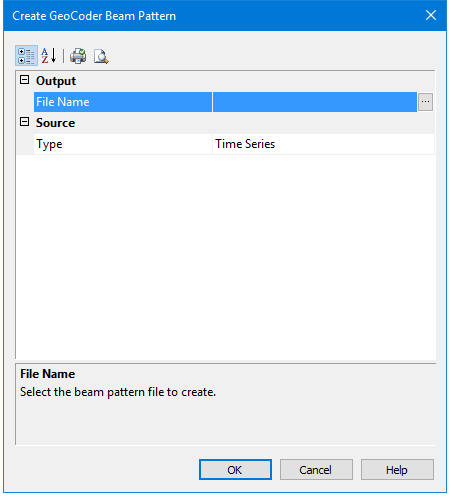
Beam pattern creation using GeoCoder uses the following dialog box:
Option | Description |
|---|---|
File Name | The filename and output directory for the beam pattern file. 1. Click the browse button (...) in the File Name field to launch the Save As dialog box. 2. Define a name and location for the file. 3. Click Save. |
Type | The type of imagery to read for processing. The options include: • Side Scan • Beam Average • Time Series |
Procedure
1. Open the track line data.
2. [Optional] Select the relevant track lines.
3. Select the Create SIPS Beam Pattern using Backscatter command.
The Create SIPS Beam Pattern using GeoCoder dialog box is displayed.
4. Define the name and location for the output file.
5. Select the imagery type from the drop-down list.
6. Click OK.
The dialog box closes and the cursor changes shape.
7. Use the cursor to draw a bounding box around a segment of a line.
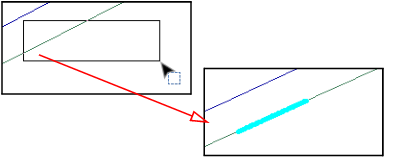
When you release the cursor, the selected segment of the line is highlighted. HIPS will then automatically create the beam pattern from the segment. The Output window and progress bar show the status of the beam pattern creation.
The GeoCoder beam pattern file will be saved with a *.bpt extension.
You can view a loaded beam pattern in the Beam Pattern View window or the Signal Display window, where it will appear as a yellow line. See View Beam Pattern and Open Signal Display Window.
Menu | Tools >HIPS and SIPS >Beam Pattern >Close |
Tool |
|
The current beam pattern must be closed before another beam pattern can be created.
8. Click the Close Beam Pattern command.

