Menu | File > Export > Selection > HOB |
Export a selection of features to a HOB file, extension .hob.
Features are not clipped during export; entire features are exported, not just the portion of the feature that is visible in the Display window.
A mapping file can be applied to convert features from one data format to another. A catalogue must be associated with the data.
This file can be opened in a chart viewer program.
Related commands:
Procedure
1. Select features to be exported.
2. Select the Export Selection to HOB command.
A Save As dialog box is displayed.
3. Select a location and a name for the file.
4. Click Save.
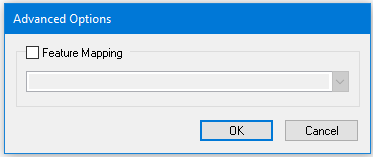
The Advanced Options dialog box is displayed.
Option | Description |
|---|---|
Feature Mapping | On: Apply a mapping file to convert exported features from one data format to another. Select the file from the list. Off: Export the features directly without a mapping file. |
Mapping file | If any mapping files exist, they are listed here. |
5. Enable Feature Mapping, select a mapping file and click OK.
The Select Catalogue dialog box is displayed.
6. From the Name list, select a data type.
The dictionary and profile associated with that data type is displayed in the Profile and Dictionaries fields.
7. Click OK.
The features are exported.