Once you have examined and cleaned a subset, the subset area can be assigned one of three classifications:
• Complete: All data in the selected area is clean and ready for further processing or export.
• Partially Complete: Not all the data within the area has been viewed and verified as clean in Subset Editor.
• Reset: Data has not been verified or cleaned.
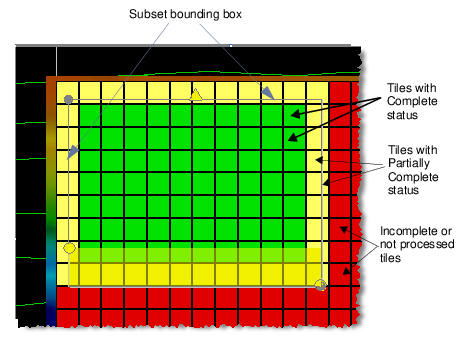
The area is colour-coded in the Subset Tile according to the selected cleaning status classification (and the settings in the Properties on the Subset Control window):
• Complete = green (2)
• Partially Complete = yellow (1)
• Incomplete or not processed = red (0).
To assign a cleaning status to a subset area,
1. Select the appropriate status from the Subset Editor toolbar or from the Tools >Subset Editor sub-menu.
The flagged tiles will be displayed with the colour appropriate to their status. Only tiles totally encompassed by the subset bounding box are flagged with the selected status.
Tiles only partially covered by the bounding box are flagged as Partially Complete, as in the example below.
Tracking Layer Options
The layer containing the tracking tiles has options which can be set in the Subset Control window. (See Subset Controls.)