Menu | Tools > Limits and Boundaries > Bay Closing Report |
Tool |
|
Menu | Tools > Limits and Boundaries > Bay Closing Report |
Tool |
|
A bay closing line is a set of one or more lines that spans the opening of a bay. For purposes of Law of the Sea, a bay closing line is legal if it meets these criteria:
• The combined length of all lines required to close a bay is less than or equal to 24 nautical miles.
• The area of the bay must be greater than or equal to the area of a semi-circle that uses the combined length of all lines required to close a bay as a diameter.
This command checks the legality of an existing bay area and generates two kinds of reports.
If you generate the report to the Output window, it contains the following information:
• The area of the bay
• The area of the semi-circle created from the bay closing line
• The length of the bay closing line
• The status of the length and area criteria (PASS or FAIL)
• The legality of the bay closing line (YES or NO)
• The start point, end point, length and azimuth of each segment of the bay closing line.
If you save the report as a file, the same information is saved in three separate files:
• area: Comma-separated file named <name>_areas.csv.
• baseline: Comma-separated file named <name>_baselines.csv.
• datum: Text file named <name>_datum.txt.
The <name> value is defined in the Name field. By default, report files are saved in the folder:
This location can be changed and will be remembered the next time to tool is launched.
All bay areas must be represented by area feature objects in order to be processed. If a bay does not have an area feature object, it will not be included in the report. |
Interface
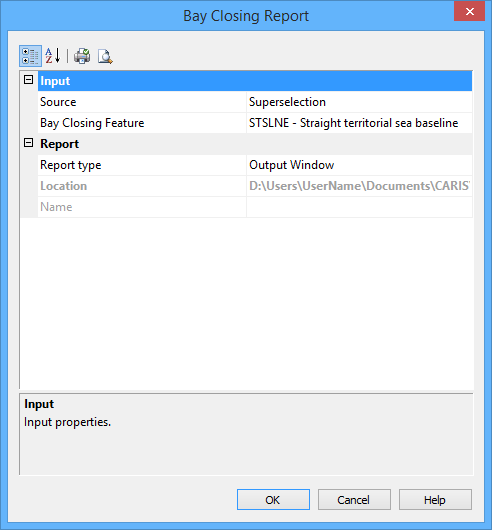
The Bay Closing Report command uses the following dialog box.
Group | Option | Description |
|---|---|---|
Input | Source | The layer that contains the bay closing areas. If one or more areas are selected, the report will be generated for the selected areas only. If no areas are selected, the report will be generated for all areas on the layer. |
Bay Closing Feature | The feature acronym that was assigned to identify the bay closing line. The standard feature acronym is strbln, but you should check your data to find out what was used. Click Browse (...) to select the feature acronym. | |
Report | Report Type | Select from: • File: Three output files are produced. • Output Window: Results are reported in the output window. • Both: Both files and report are produced. |
Location | The location in which to create the report file. Click the Browse button (...) to navigate to and select a folder. This option is only enabled if the Report Type is set to File or Both. | |
Name | The name to assign to the report files. This will be added to the file names as a prefix. |
Procedure
1. [Optional] Select one or more bay areas.
2. Select the Bay Closing Report command.
The Bay Closing Report dialog box is displayed.
3. Set any required options.
4. Click OK.
The report in the output window should look something like this:
====== Bay Closing Report start: Jul 9, 2010 9:54:39 AM ====== Bay Area: 537532470.87 Square Metres Semicircle Area: 59781287.73 Square Metres Bayline Length: 6.66 Int. Nautical Miles Length Criterion: PASS Area Criterion: PASS Legal: YES
Start Point: 48-27-14.95656N , 54-48-57.06792W End Point: 48-27-07.57224N , 54-44-04.10568W Length: 3.25 Int. Nautical Miles Azimuth: 92.139560498345 - Start Point: 48-27-37.61748N , 54-18-28.34208W End Point: 48-27-41.2956N , 54-17-00.09636W Length: 0.98 Int. Nautical Miles Azimuth: 86.4048838093175 - Start Point: 48-27-54.83448N , 54-15-56.01564W End Point: 48-26-24.80568N , 54-13-03.95436W Length: 2.43 Int. Nautical Miles Azimuth: 128.170031927769 - 1 areas of 1 processed. ====== Bay Closing Report end: Jul 9, 2010 9:54:39 AM (Elapsed Time: 00:00:00) ======
|
Report files look like this:
areas.csv
Bay Sequence, Area (Square Metres), Semi-Circle Area (Square Metres), Total Baseline Length (Metres), Length Criterion, Area Criterion, Legal B1,918417.54,301134.78,875.70,PASS,PASS,YES B2,4344957.44,1238054.36,1775.59,PASS,PASS,YES
|
baselines.csv
Bay Sequence, Baseline Sequence, Begin Latitude, Begin Longitude, End Latitude, End Longitude, Length (Metres), Azimuth B1, L1,"41-20-08.40516S","174-48-12.60612E","41-20-17.34648S","174-47-36.86136E",875.70,251.636 B2, L2,"41-17-11.4036S","174-48-15.22332E","41-17-04.35192S","174-49-30.95328E",1775.59,82.9695
|
Datum.txt
Coordinate System Information: Type: LLDG Units: Decimal Degrees Datum: WG84 (6,378,137.0000 6,356,752.3140) Datum Transform to WG84: 7 parameter: 0.0000 0.0000 0.0000 0.0000 0.0000 0.0000 1.000000000
|
