Menu | Tools > Limits and Boundaries > Interactive Baseline |
Tool |
|
Menu | Tools > Limits and Boundaries > Interactive Baseline |
Tool |
|
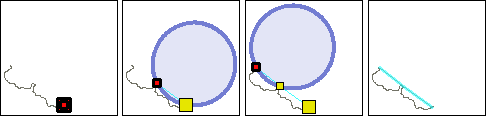
Digitize a baseline interactively. A circle is attached to the mouse pointer. The circle represents a wagon wheel whose centre travels on the limit corresponding to its radius. This lets you interactively digitize the baseline points contributing to a given maritime limit using a nautical chart as backdrop. If you attempt to add a point beyond the specified radius, the circle will disappear.
Interface
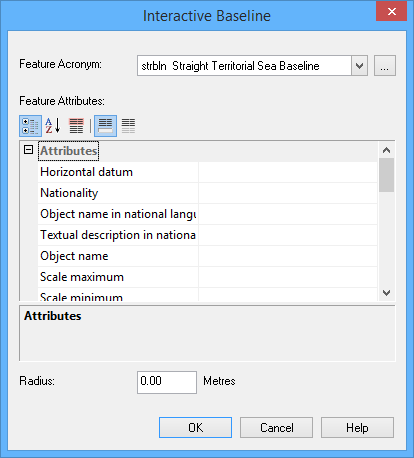
The Interactive Baseline command uses the following dialog box.
Option | Description |
|---|---|
Feature Acronym | Click Browse (...) to select the feature acronym. |
Feature Attributes | The attributes are displayed here. Required attributes are tinted red. |
Radius | The radius of the wagon wheel's circle in nautical miles. This represents the greatest allowable distance between points. |
Procedure
1. Choose the Interactive Baseline command.
The Interactive Baseline dialog box is displayed.
2. Select a feature acronym.
3. Set any required attributes.
4. Enter a radius.
5. Click OK.
6. Click at the start point of the new line.
7. Press and hold the left mouse button and move the mouse.
A circle is attached to the mouse pointer. This circle is anchored at the point you just entered; it will “slide” around as the pointer moves. If the circle disappears, the pointer has moved outside the limit indicated by the circle.
8. Release the mouse button to place the next point.
9. Repeat until the entire line has been added.
10. Right-click and select Line Digitizer > End Line.
The baseline is drawn.