Menu | File > New > Product > From Multiple S-57 Datasets |
Create a new AML, ENC, IENC, or custom product by combining data from two S‑57 or HOB files.
The product extent can be one of these:
• The greater extent of the two files.
• The extent of the first file
• The extent of a feature in the first file.
If you use the third method, it is recommended that you define the feature and its extent in advance.
Once created, the product is displayed in the Layers window. The parent layer contains product metadata. Child layers contain data. The Layout layer contains the product boundary.
The product boundary is defined by the product layer (PROLAY) feature. The coordinates for the product boundary are included with the product metadata.
Interface
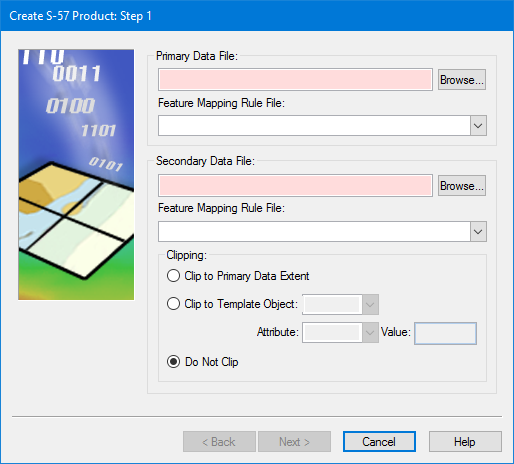
Step 1 is specific to this command:
Option | Description |
|---|---|
Primary Data File | Primary Data File: Click Browse to select the first data file. If this is a HOB file, the Select Catalogue dialog box is displayed. Feature Mapping Rule File: If you are mapping the file from one format to another, select a mapping file from the list. |
Secondary Data File | Secondary Data File: Click Browse to select the second data file. If this is a HOB file, the Select Catalogue dialog box is displayed. Feature Mapping Rule File: If you are mapping the file from one format to another, select a mapping file from the list, |
Clipping | Clip the data using one of these methods: • Clip to Base Cell Boundary: The secondary file is clipped using a rectangle equal to the extent of the primary file. • Clip to Template Object: The secondary file is clipped using one or more features from the primary file as templates. Choose a feature from the Template Object list, select an attribute acronym from the Attribute list, then type a value in the Value field. • Do Not Clip: The extent covers both files. |
Procedure
1. Select the Create Product from Multiple Datasets command.
2. Select the primary file.
3. Select the secondary file.
4. [Optional] Select any necessary mapping files.
5. Choose a clipping method.
6. Click Next.
The Create S‑57 Product wizard, as described in Create S-57 Product, is displayed. The step numbers on the dialog boxes may differ.
7. Continue to define the product using the wizard.