Interface
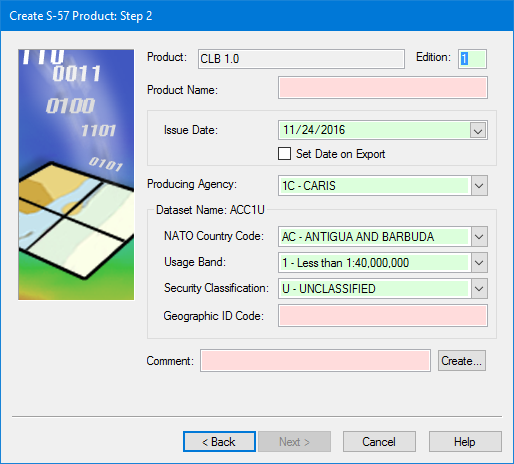
Product information dialog box for AML 1 and AML 2.1 products:
Option | Description |
|---|---|
Product | [Read-only] The product type selected in Step 1. |
Edition | [Mandatory] The edition number of the product. Default is |
Product Name | [Mandatory] A name for the product. The product name does not have to follow standard AML naming convention. |
Issue Date | [Mandatory] The issue date for the product. Defaults to the current date. Select another date from the calendar or enable Set Date on Export to assign the export date to the product. |
Producing Agency | [Mandatory] A two-character code that designates the hydrographic agency that owns the data. Select from the list. |
Dataset Name | [Mandatory] A name for the dataset which is built from the fields in the frame: • NATO Country Code: A two-character code to identify the producing country. Select from the list. • Usage Band: This determines the purpose and scale for the new dataset. Select from the list. • Security Classification: This determines the government-authorized security • clearance required by the person who will use the chart. Select from the list. • Geographic ID Code: This is a user-defined number that uniquely identifies the generated dataset. Type a value. |
Comment | [Mandatory] A comment built from various options. See Create Comment dialog box below. |
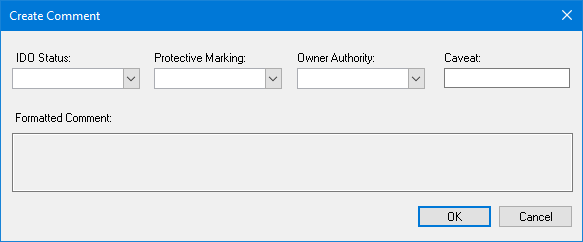
Create Comment dialog box:
Option | Description |
|---|---|
IDO Status | International Defense Organization (IDO) status information for AML. Select from the list. |
Protective Marking | Classification code that sets the minimum standards of protection for the data. Select from the list. |
Owner Authority | The owner of the data, derived from the country code. Select from the list. |
Caveat | The clearance level for viewing data with a Confidential level or greater. |
Formatted Comment | [Read-only] The comment being built from the selections in the options. |
Procedure
1. Set all mandatory options or accept the default.
2. Click Next.