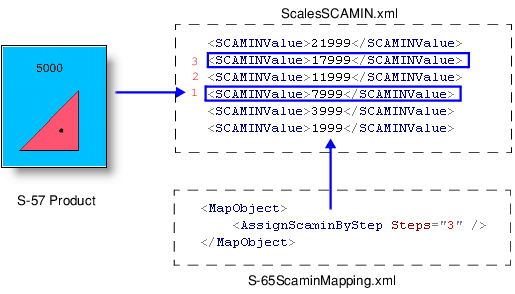
The step method uses step values from the S-65 standard for ENC consistency and the compilation scale of the chart. S-57 Composer assigns these step values to each area, line and point.
This is done using two files: scalesSCAMIN.xml and assignIHOscamin.xml, located in:
C:\Program Files\CARIS\<application>\<version>\modules\S‑57 Composer\support
If necessary, they can be modified to meet your requirements.
ScalesSCAMIN.xml contains a list of SCAMIN values that are used as starting points for calculating SCAMIN. For example:
<SCAMIN> |
<SCAMINValue>19999999</SCAMINValue> |
<SCAMINValue>9999999</SCAMINValue> |
<SCAMINValue>4999999</SCAMINValue> |
<SCAMINValue>2999999</SCAMINValue> |
<SCAMINValue>1499999</SCAMINValue> |
<SCAMINValue>699999</SCAMINValue> |
<SCAMINValue>499999</SCAMINValue> |
<SCAMINValue>349999</SCAMINValue> |
<SCAMINValue>259999</SCAMINValue> |
<SCAMINValue>179999</SCAMINValue> |
<SCAMINValue>119999</SCAMINValue> |
<SCAMINValue>89999</SCAMINValue> |
<SCAMINValue>59999</SCAMINValue> |
<SCAMINValue>44999</SCAMINValue> |
<SCAMINValue>29999</SCAMINValue> |
<SCAMINValue>21999</SCAMINValue> |
<SCAMINValue>17999</SCAMINValue> |
<SCAMINValue>11999</SCAMINValue> |
<SCAMINValue>7999</SCAMINValue> |
<SCAMINValue>3999</SCAMINValue> |
<SCAMINValue>1999</SCAMINValue> |
<SCAMINValue>999</SCAMINValue> |
</SCAMIN> |
S-57 Composer checks the compilation scale of the product against the <SCAMIN> list and then applies the number of steps defined in S‑65_ScaminMapping.xml to each feature. This assigns the final SCAMIN value.
To ensure that SCAMIN values strictly conform to the S-65 standard, the product must use a scale value from the |
assignIHOscamin.xml is a mapping file that assigns the number of steps for applying SCAMIN. You can modify the file, if necessary.
This is an example from S-65ScaminMapping.xml
<Object Acronym="BOYLAT"> |
<Filter> |
<PrimitiveIsEqualTo Primitive="Point" /> |
</Filter> |
<MapObject> |
<AssignScaminByStep Steps="3" /> |
</MapObject> |
</Object> |
A step value of 3 is assigned to the BOYLAT feature.
In this example, a product at a scale of 5000 contains a BOYLAT (lateral buoy) feature. In the <SCAMIN> list, the nearest higher SCAMIN value to 5000 is 7999. 7999 is used as the start value for applying the steps.
The S-65ScaminMapping file assigns a step value of three to the BOYLAT feature. This means that S-57 Composer increments to a smaller scale by three and sets the SCAMIN value of the BOYLAT feature to 17999.
For master-slave features such as a buoy and light, the slave feature is assigned the SCAMIN value of the master feature. This is done using assignIHOscamin.xml by copying the SCAMIN value of the master feature to the slave feature:
<Object Acronym="LIGHTS"> |
<Filter> |
<And> |
<PrimitiveIsEqualTo Primitive="Point" /> |
<ObjectIsASlave /> |
</And> |
</Filter> |
<MapObject> |
<AssignScaminFromMaster /> |
</MapObject> |
</Object> |
The S-65 standard requires the following:
• line and area features which extend beyond the cell extent of the product and into a neighbouring cell of a smaller navigational purpose be assigned the SCAMIN values of the smaller navigational-purpose cell.
• the individual occurrences of a feature across several usages should be set to 1,2,3, or 4 steps smaller than the smallest usage.
S-57 Composer applies SCAMIN methods only to the product that is open and not to neighbouring charts or charts on other usages. You should examine the SCAMIN requirements of the open product against neighbouring or associated charts.
S-57 Composer ignores SCAMIN for conditions like these:
• The most significant OBSTRN (obstruction) feature in a group of OBSTRN features within close proximity.
• A group of OBSTRN features in close proximity to each other, or within an OBSTRN area (excluding the most significant).
• Isolated installations of OFSPLF (offshore platform) features.
• A SILTNK (silo/tank) feature as a representative of a group of SILTNKS.