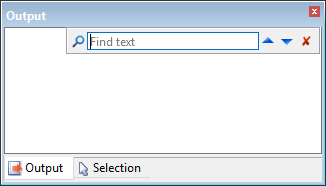
Pop-up | Find (Output window) |
Key | Ctrl + F |
The Find command is used to search for a specific word or phrase in the content of the Output window. When a search is run, the Output window will scroll to focus on the first instance of the search phrase found in the content. A grey highlight will be displayed around the search phrase. The arrow buttons can be used to navigate through each instance of the search phrase found in the window.
Related commands:
• Clear
• Save All
Interface
The Find command launches as a toolbar in the Output window.
Option | Description |
|---|---|
Find text | The term or phrase to search for. Type in the box. |
| Click to search for the user-specified search phrase. |
| Click to search up through the content of the Output window to find a previous instance of the search phrase. |
| Click to search down through the content of the Output window to find the next instance of the search phrase. |
| Click to close the Find toolbar when you are finished searching. |
Procedure
1. Select the Find command.
2. Type the search term or phrase in the Find text box.
3. Click the Search button or press the <Enter> key.
4. Use the Up or Down Arrow buttons to navigate through the search results.
The content of the Output window shifts to display each instance of the search phrase as the arrow buttons are clicked, adding a grey highlight around the search phrase.
5. Click the Exit button to close the toolbar.


