Below is the S-52 Simplified section of the Portrayal Control File.
<PresentationOptions Type="S-52" Name="S-52 Simplified" Description= "S-52 Simplified Settings"> <LookupTables> <AreaLookup File="%S57Config%\symbolization\lookup\asymrefs.dic" SymbolizedBoundaries="True" /> <LineLookup File="%S57Config%\symbolization\lookup\lsymrefs.dic" /> <PointLookup File="%S57Config%\symbolization\lookup\psymrefs.dic" /> </LookupTables> <SymbolFiles Directory="%S57Config%\symbolization\symshow" /> <ColourFiles Directory="%S57Config%\symbolization\colcalib" /> </PresentationOptions> |
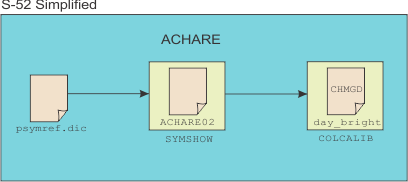
The following image shows how S-52 files that are referenced in the Portrayal Control File are used to draw an Anchorage Area (ACHARE) point feature.
Because ACHARE is a point feature, information about the feature is read from the point lookup table (psymrefs.dic). This file is referenced in the <PointLookup/> tag in Portrayal Control File.
Below is the entry for ACHARE in psymrefs.dic.
"ACHARE","","SY(ACHARE02)","6","O","STANDARD","26220" |
The symbolization entry is SY(ACHARE02). This means that symbolization is derived from the ACHARE02 symbol file.
Symbol files for S-52 are stored in the symshow folder. This folder is referenced by the <SymbolFiles/> tag in Portrayal Control.
The symshow folder contains archare02.sym file. An example of that file is shown below.
SYMB 10SY02035NIL
SYMD 39ACHARE02V012670105200402005030106100789
SXPO 90anchorage area as a point at small scale, or anchor points of mooring trot at large scale
SCRF 6ACHMGD
SVCT 32SPA;SW1;PU1264,789;PD1264,1291;
SVCT 31SPA;SW1;PU1108,938;PD1412,938;
SVCT 57SPA;SW1;PU1061,1188;PD1167,1292;PD1365,
1292;PD1463,1191;
Symbol files should be created or modified using the CARIS Symbol Editor. |
The SCRF (Symbol Colour Reference Field) field contains the colour token: CHMGD. Colour tokens for S-52 are stored in the colcalib folder. The colcalib folder is referenced by the <ColourFiles/> tag in the Portrayal Control file.
The colcalib folder contains five colour palettes. Each palette is based on an ECDIS (Electronic Chart Display and Information System) display mode.
If the display mode in CARIS is set to day_bright. The entry for the CHMGD colour token in day_bright.xml colour palette is used.
<Colour Index="4" Type="RGB" Token="CHMGD"> <R>232</R> <G>69</G> <B>196</B> </Colour> |
When the ACHARE feature is displayed in CARIS using the Day Bright palette, the feature is shown using the above RGB values. If the ECDIS display mode is changed, the feature is redisplayed using the colour palette for that mode.