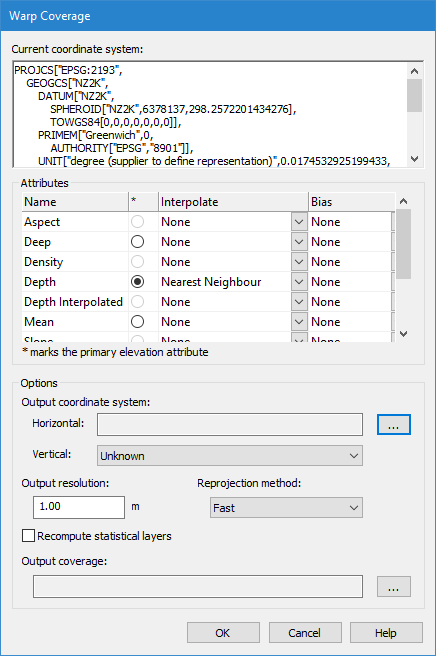
The Current coordinate system field displays the details of the current settings for the coverage. The details are displayed in well-known-text (WKT) format in order to support all coordinate system formats.
Attributes
The Attributes field contains a table of the bands of the coverage. If your source coverage is a raster surface, also listed are the options for interpolating and/or applying a biased selection of node values from the data for the new surface.
The Interpolation and Bias options are not available when applying warp to a point cloud.
The first column lists the bands of the coverage. A circle in the next column indicates that the band can be set as the primary elevation. The last two columns contain the options for interpolation and bias options. The Bias option of the attribute set as the primary elevation band must be set to Maximum or Minimum if true positions are to be carried over into the output coverage.
Interpolation
The interpolation method can be selected for any numeric attribute in the source raster surface, such as the Shoal or Deep band, in addition to the primary elevation band.
The Interpolation methods available are:
• Bicubic: Every node in the output grid is populated using a bicubic interpolation of transformed values from the input grid.1
• Bilinear: This method will perform linear interpolation first in one direction, and then again in the other direction, resulting in a quadratic interpolation. 2
• Bilinear, hole preserving: Similar to Bilinear, except that holes in the input are maintained in the output.
• Nearest Neighbour: The nearest neighbour algorithm will select the value of the nearest node, ignoring the values of neighbouring nodes.3
• None
Bias
You can set a Minimum or Maximum bias for the primary elevation attribute. All other bands have the option to “Follow Primary” or “None”.
The Bias options for the primary elevation are:
• Minimum: The minimum (or shoalest) value of the neighbouring nodes will be used for each location.
• Maximum: The maximum (or deepest) value of the neighbouring nodes will be used at each location.
• None.
The bias options for all other bands are:
• Follow Primary: This option is only available when the Primary has a minimum or maximum bias method selected and must be set to copy the band into the output grid.
• None. This option is set if the band is not required in the output grid.
Output coordinate system
Use the Horizontal field to set a horizontal system. You can select a system for the output coverage that is different from the one for the source coverage.
Output resolution
The Output resolution field is used to resample a raster surface. You can choose to create the surface with a higher or a lower resolution. The value displayed in the Output resolution field is that of the source surface.
This option is not available for warping a point cloud.
Reprojection method
Use the Reprojection method option to choose the method in which the necessary algorithms are applied.
• Fast: This method computes the reprojected node locations using an approximation technique, looking at portions of the coverage instead of individual points. This method is selected by default.
• Exact: This method computes the reprojected node locations exactly, transforming every individual point in the coverage. This is a more robust method, however, it takes longer to process.
This option is not available for warping a point cloud.
Recompute statistical layers
The Recompute statistical layers option allows default statistical layers in a coverage to be recomputed during the transformation using specific values on the layer in the source coverage. These layers include:
• Deep: Recomputed using the deepest value on the layer.
• Mean: Recomputed using the mean of the values on the layer.
• Shoal: Recomputed using the shoalest value on the layer.
• Density: Recomputed using the sum of all the density values on the layer that fall within the grid cell area.
Standard Deviation (Std_Dev): Recomputed using the Pooled Variance principle. The Mean and Density layers must be present in the coverage in order for this layer to be recomputed.
1 Wikipedia® The Free Encyclopedia, “Bicubic interpolation”, 2014, <http://en.wikipedia.org/wiki/Bicubic_interpolation> (accessed December 8, 2014).
2 Wikipedia® The Free Encyclopedia, “Bilinear interpolation”, 2014, <http://en.wikipedia.org/wiki/Bilinear_interpolation> (accessed December 8, 2014).
3 Wikipedia® The Free Encyclopedia, “Nearest-neighbor interpolation”, 2014, <http://en.wikipedia.org/wiki/Nearest-neighbor_interpolation> (accessed December 8, 2014).