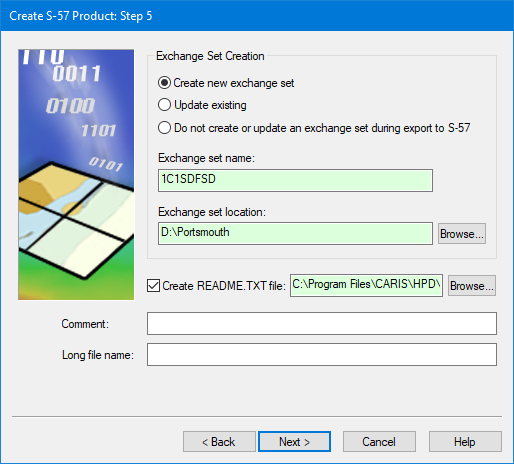
This is step 5 if you are creating a standalone product. |
Create or update exchange sets.
Interface
Option | Descriptions |
|---|---|
Exchange Set Creation | Choose one of the following: • Create new exchange set: • Update existing: • Do not create or update an exchange set during export to S-57: Exchange set information: • Exchange set name: A name for the exchange set. This can be any alphanumeric characters. • Exchange set location: The folder containing the exchange set. If you want to change the default, click Browse and navigate to the new folder. |
Create README.TXT file | Off: No On: Include a file named |
Comment | Extra information. Type in the box. |
Long file name | A descriptive name for the exchange set. Type in the box. |
Procedure: New exchange set
1. Enable Create new exchange set.
2. Type an Exchange set name or accept the default.
3. Define the Exchange set location or accept the default.
4. [Optional] Type additional information in the Comments field.
5. [Optional] Type a Long file name for a the new exchange set.
6. Click Next.
Procedure: Update exchange set
To update an existing exchange set:
1. Enable Update existing.
The exchange set name is displayed. This cannot be changed.
If the exchange set is not located in the default folder, a warning is displayed. You can modify the location of the exchange set.
2. Click Browse to select a folder.
The path is displayed in the Exchange set location field.
3. [Optional] Enable Create README.txt.
4. [Optional] Type additional information in the Comments field.
5. [Optional] Type a Long file name for a the new exchange set.
6. Click Next.
Procedure: No exchange set
If you do not want an exchange set:
1. Enable Do not create or update an exchange set during export to S-57.
Only a .000 file is created.
2. Click Next.