 CARIS HPD Paper Chart Editor
 CARIS HPD Paper Chart Editor
CARIS Paper Chart Composer
Menu | File > Export > Sheet > DXF |
Export the sheet to a DXF (AutoCAD) file.
A specific area can be exported by using the Set Export Area command.
Related commands:
• • • • • | • • • • • |
Interface
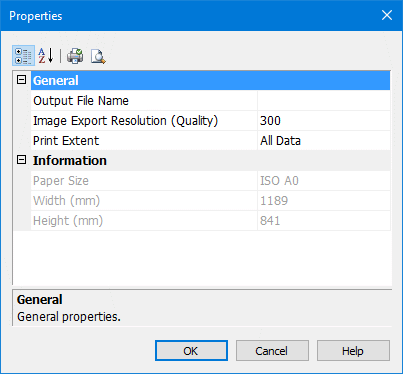
Properties | Description |
|---|---|
Output File Name | The name of the exported DXF file. 1. Click Browse to open the Save As dialog box. 2. Select a path and enter a name for the file. 3. Click Save. The path and name are listed in the dialog box. |
Image Export Resolution | Resolution for images associated with the panel. This option is only for images and not the file. Type a resolution value. |
Print Extent | The panel area to be printed. Select from: • All Data to export the entire sheet. • Current View to export the area of that is currently displayed. • Export Area if you set an area of the panel for export. |
Procedure
1. In the Layers window, select Sheet layer.
2. Select the Export Sheet to DXF command.
The DXF Properties dialog box is displayed.
3. Define any necessary properties and click OK.