 CARIS HPD Paper Chart Editor
 CARIS HPD Paper Chart Editor
CARIS HPD Product Editor
CARIS HPD Source Editor
CARIS S-57 Composer
CARIS Paper Chart Composer
Menu | Tools > Use Coordinates |
Tool |
|
Centre the view in the Display window on specific coordinates. No features will be selected.
Interface
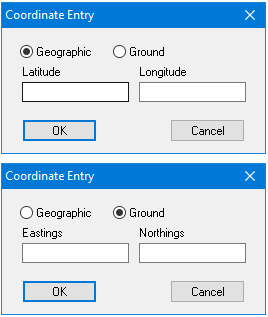
Option | Description |
|---|---|
Coordinate type | Geographic: Geographic coordinates are in latitude and longitude. Ground: Ground coordinates are measured in eastings and northings ( Available coordinate types depend on the active coordinate reference system. |
Coordinate values | These depend on the coordinate type: • Latitude and Longitude: These values include an indication of the direction from the equator or the prime meridian. If you do not enter an indicator, the coordinate value will be positive. Indicators can be: • Quadrant indicator: A character at the end of the coordinate value, which can be • Positive and negative indicator: A plus or minus sign at the start of the coordinate value. North and East are positive (+), West and South are negative (-). • Eastings and Northings: These can be positive or negative. They do not refer to north, south, east, and west. Type coordinates in the boxes. |
Procedure
1. Select the Centre on Coordinate command.
The Coordinate Entry dialog box is displayed.
2. Select Geographic or Ground.
3. Type coordinate values.
4. Click OK.
The view in the Display window is recentred.
