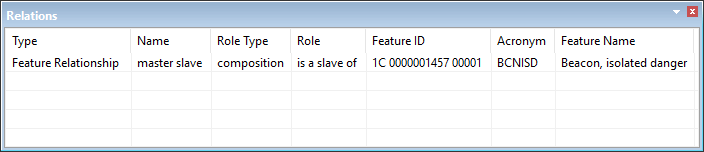
The Relations window displays collection object or master-slave information for a the superselected feature.
1. Select one or more features.
2. In the Selection window, superselect one feature.
If the superselected feature is part of a relationship, it is displayed in the Relations window.

The Relations window contains the following columns:
Column | Description |
|---|---|
Type | The type of relationship. Can be Feature Relationship, Collection, Annotation, or Information Object |
Name | The name of the relationship. The can be master/slave, temporary change, collection, or other information based on the specific relationship. |
Role Type | The type of role. This can be composition, association, and other values based on the specific relationship. |
Role | Whether the selected feature is a master of, a slave of, a component of the related feature. |
Feature ID | The related feature object ID (unique reference) |
Acronym | The related feature acronym, used to define the type of collection or the feature object type of a master or slave feature. |
Feature Name | The name of the related feature. |
Right-click on a column heading to display column setting commands.
• <list of column headings> • • |
Pop-up menu commands:
• • • |