The step method for applying scale minimum values uses values from the S‑57 UOC standard and the compilation scale of the chart. The step values are applied to each area, line, and point feature.
This is done using scalesSCAMIN.xml and assignIHOscamin.xml, located in ...\CARIS\HPD\<version>\system. Both files can be modified to meet your requirements.
ScalesSCAMIN.xml contains a list of scale minimum values that are used as starting points for calculating scale minimum values. This is an example:
<SCAMIN> |
<SCAMINValue>19999999</SCAMINValue> |
<SCAMINValue>9999999</SCAMINValue> |
<SCAMINValue>4999999</SCAMINValue> |
<SCAMINValue>2999999</SCAMINValue> |
<SCAMINValue>1499999</SCAMINValue> |
<SCAMINValue>999999</SCAMINValue> |
<SCAMINValue>699999</SCAMINValue> |
<SCAMINValue>499999</SCAMINValue> |
<SCAMINValue>349999</SCAMINValue> |
<SCAMINValue>259999</SCAMINValue> |
<SCAMINValue>179999</SCAMINValue> |
<SCAMINValue>119999</SCAMINValue> |
<SCAMINValue>89999</SCAMINValue> |
<SCAMINValue>59999</SCAMINValue> |
<SCAMINValue>44999</SCAMINValue> |
<SCAMINValue>29999</SCAMINValue> |
<SCAMINValue>21999</SCAMINValue> |
<SCAMINValue>17999</SCAMINValue> |
<SCAMINValue>11999</SCAMINValue> |
<SCAMINValue>7999</SCAMINValue> |
<SCAMINValue>3999</SCAMINValue> |
<SCAMINValue>1999</SCAMINValue> |
<SCAMINValue>999</SCAMINValue> |
</SCAMIN> |
HPD checks the compilation scale of the product against the <SCAMIN> list and then applies the number of steps from assignIHOscamin.xml to each feature. This assigns the final scale minimum value.
A scale value from the |
The compilation scale is determined from the S-57 product or from a meta-compilation scale area (M_CSCL feature). If a feature falls within a meta-compilation scale area, the compilation scale is taken from the CSCALE attribute of the area. The CSCALE attribute overrides the compilation scale of the product.
assignIHOscamin.xml is a mapping file that assigns the steps for applying a scale minimum value to each feature. You can modify the file if necessary.
This is an example from assignIHOscamin.xml:
<Object Acronym="BOYLAT"> <Filter> <PrimitiveIsEqualTo Primitive="Point" /> </Filter> <MapObject> <AssignScaminByStep Steps="3" /> </MapObject> </Object> |
Example
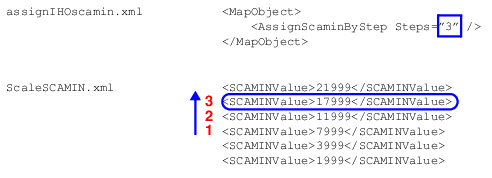
In this example, an S-57 product, created at a scale of 5000, contains a BOYLAT (lateral buoy) feature.
The compilation scale of the chart is used to determine step 1 in ScaleSCAMIN.xml. In this example, the value 5000 does not exist in the file, therefore the next highest value is used. In this example, that would be 7999.
In assignIHOscamin.xml, the step number is defined as 3.
Scale minimum value is calculated to be 17999 by counting upwards from step 1:
For parent/child features such as a buoy and light, the child feature is assigned the scale minimum value of the parent feature.
<Object Acronym="LIGHTS"> <Filter> <And> <PrimitiveIsEqualTo Primitive="Point" /> <ObjectIsASlave /> </And> </Filter> <MapObject> <AssignScaminFromMaster /> </MapObject> </Object> |